Overview
About Square
Square is the all-in-one commerce platform trusted by over 4 million businesses worldwide. From neighborhood coffee shops to global retailers, Square powers point of sale, online stores, inventory management, payments, and banking. Whether you’re running a physical store, online shop, or restaurant, Square handles your entire commerce operation.Transform Your Square Store with AI
Integrate Lua AI with Square to turn your e-commerce business into an AI-powered sales machine. Your AI agent connects directly to your Square account, accessing your products, inventory, orders, and customer data to provide instant, personalized shopping assistance across all channels. The Business Impact:- 🚀 Boost Sales - AI converts browsers into buyers with personalized recommendations
- ⏰ 24/7 Availability - Never miss a sale, even at 3 AM
- 💬 Multi-Channel Commerce - Sell on WhatsApp, Instagram, Facebook, Website
- 🎯 Smart Upselling - AI suggests complementary products naturally
- 📊 Real-Time Inventory - Access live stock levels from Square
- ⚡ Instant Service - No waiting, no phone calls, just instant answers
- 🛒 Reduce Cart Abandonment - AI guides customers through checkout
- 💰 Higher Cart Values - Intelligent product recommendations
POS + E-commerce
Unified commerce platform
5-Minute Setup
OAuth integration, zero configuration
Multi-Industry
Retail, Food & Beverage, and more
AI Shopping Assistant
Intelligent product search and checkout
What Square E-commerce Offers
According to Square: Commerce Solutions:- 💳 Payments - Accept payments anywhere
- 🏪 Point of Sale - Retail and Restaurant POS
- 🌐 Online Stores - E-commerce websites and profiles
- 📦 Inventory - Real-time stock management
- 💰 Banking - Checking, savings, loans, credit cards
- 📊 Analytics - Business insights and reporting
- 👥 Customer Engagement - Loyalty, marketing, directories
- 🛍️ Retail (clothing, home & gift, grocery)
- 🍽️ Food & Beverage (restaurants, cafes, food trucks)
- 🎪 And many more
- Square Terminal, Register, Handheld
- Contactless readers, Kiosks, Stands
Prerequisites
Before connecting Square to Lua:- Active Square Account - Sign up at squareup.com
Integration Setup
📺 Video Tutorial
Prefer watching a video? Follow along with our step-by-step video guide
1
Navigate to Lua Square Auth
Open your browser and go to:
https://auth.heylua.ai/square/auth
This secure OAuth flow connects your Square account to Lua without sharing
your password.
2
Sign In to Square
Click “Sign in with Square” or “Continue with Square” Enter your
Square account credentials: - Email address - Password - (Two-factor
authentication if enabled)
Screenshot: Square login form showing email and password fields

3
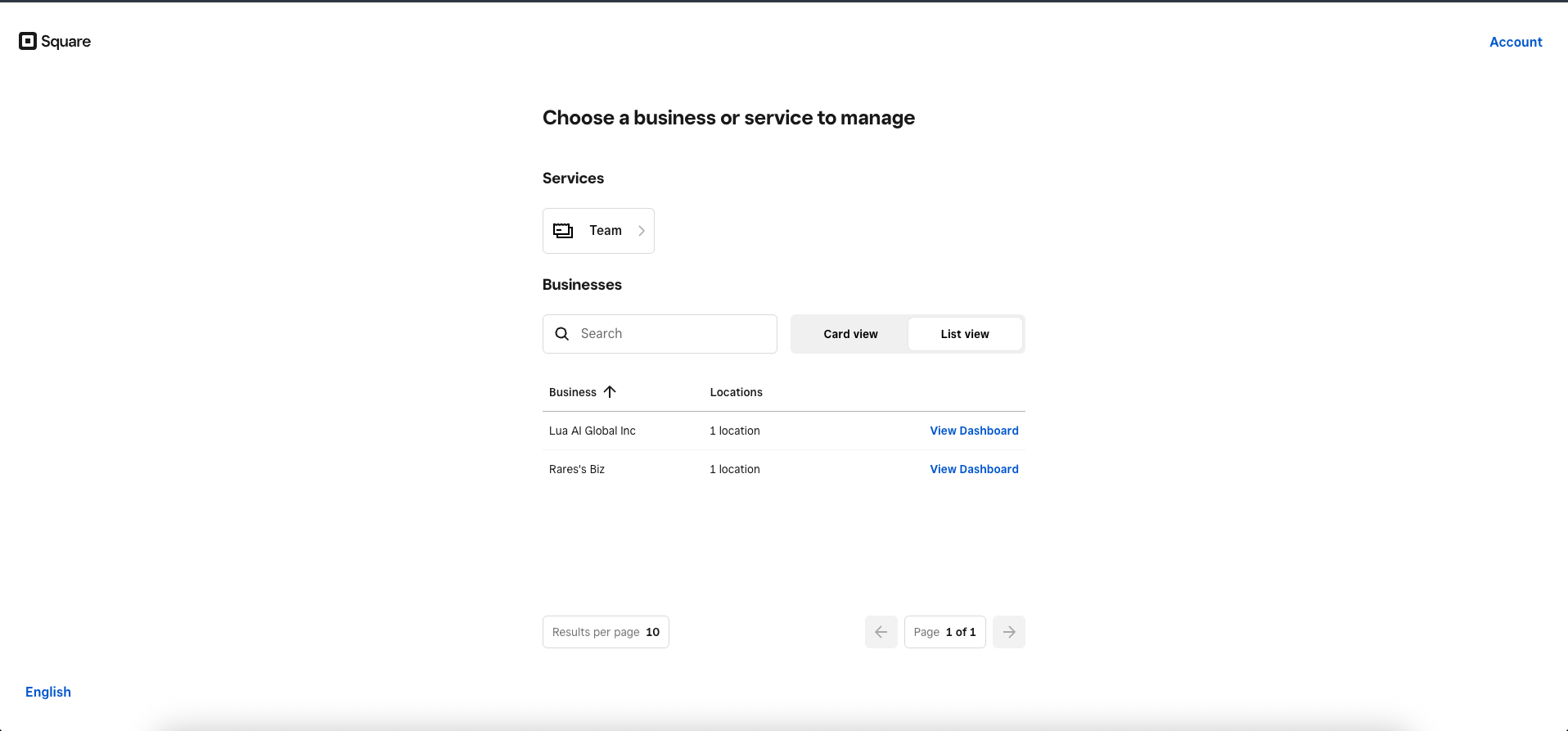
Select Your Business (If Applicable)
If your Square account manages multiple businesses, you’ll see a selection
screen. Choose the business you want to connect to your Lua agent.
Screenshot: Business selection screen showing multiple Square
locations/businesses

Managing multiple businesses? You can connect different Lua agents to
different Square locations. Just repeat this process for each agent/business
combination.
4
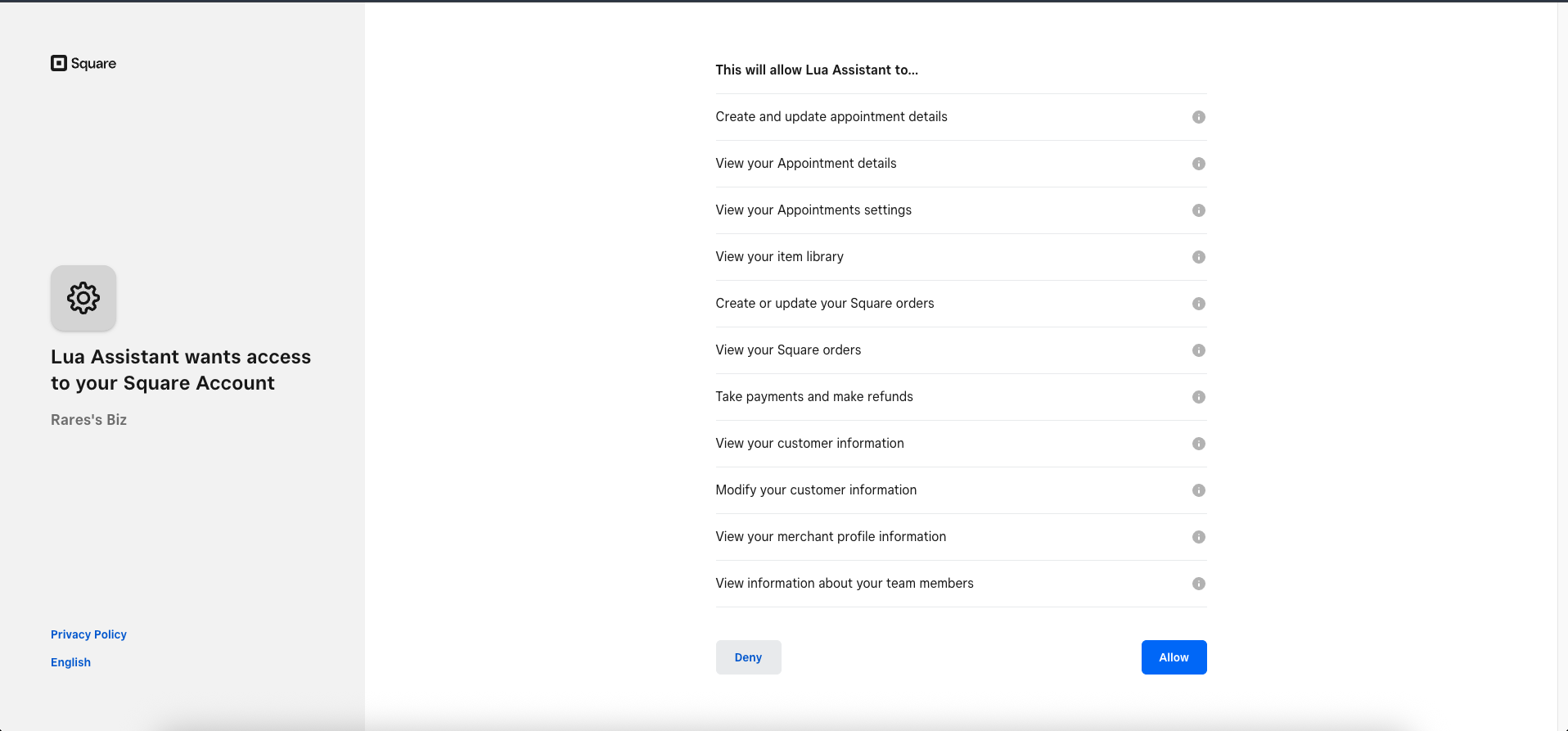
Grant Permissions
Square will display the permissions that Lua needs to function.Lua requires access to:
Screenshot: Square OAuth permission screen listing required access scopes
with “Allow” button
- 📦 Products & Inventory (for product search and availability),
- 🛒 Orders (for order creation and tracking),
- 👤 Customer Info (for personalized service),
- 💳 Payments (for checkout links)

5
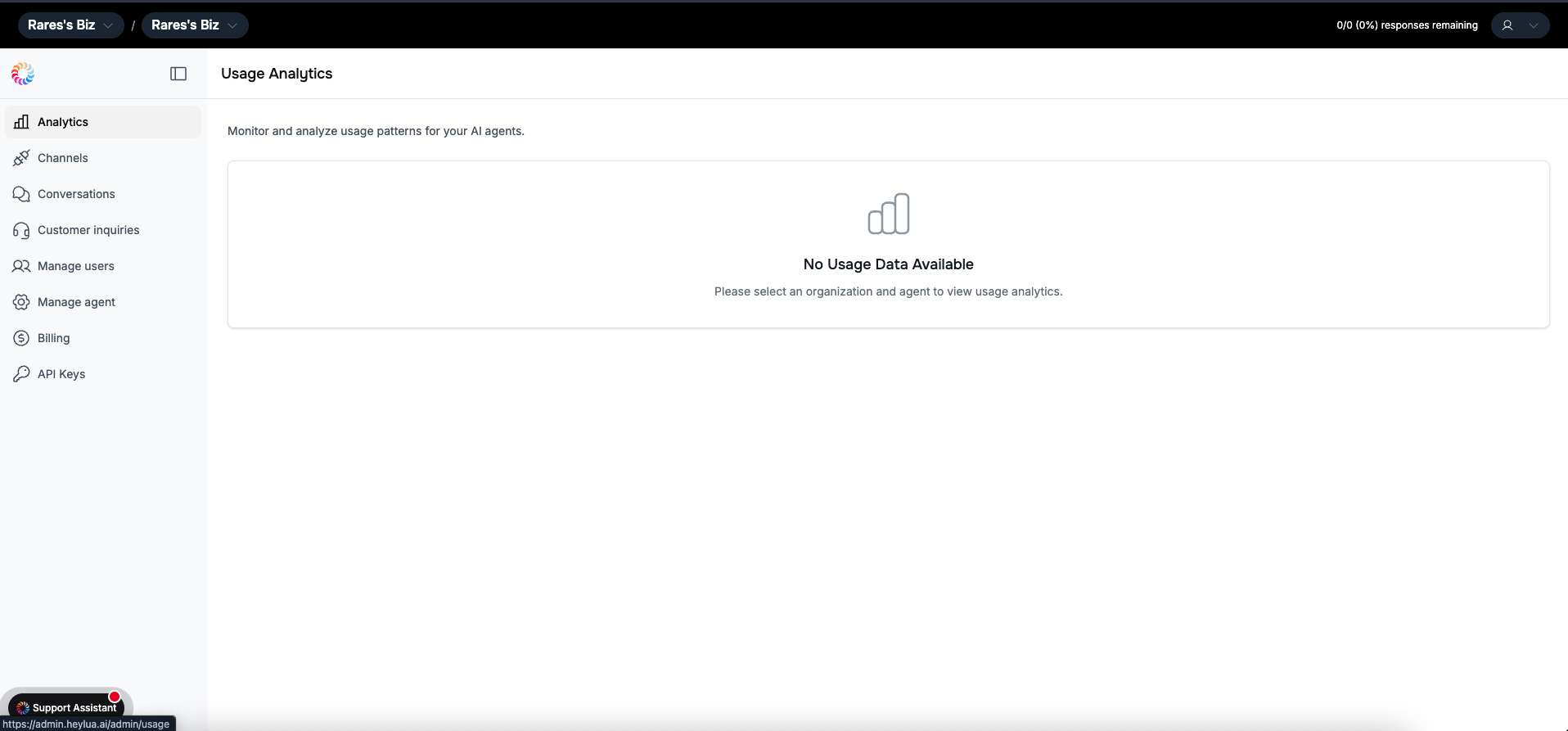
Integration Complete!
You’ll be redirected to your Lua Admin Dashboard Your Square integration
is now active and ready to use!
Screenshot: Lua admin dashboard showing successful Square integration

Success! Your Lua agent can now access your Square catalog, inventory,
and order data in real-time.
What Your Agent Can Do
With Square e-commerce integration, your AI agent becomes a powerful shopping assistant:Product Search
Find items in your Square catalog
Inventory Check
Real-time stock availability
Product Details
Pricing, specs, descriptions, images
Smart Recommendations
AI suggests relevant products
Cart Building
Create orders in conversation
Checkout Links
One-click Square checkout URLs
Order Tracking
Check order status and shipping
Customer History
Access past purchases
Use Cases by Industry
- 🛍️ Retail Stores
- 🍽️ Restaurants & Cafes
- 🏪 Specialty Retail
Perfect for: Clothing, Home & Gift, Grocers, Specialty RetailYour AI shopping assistant can:
- “Show me men’s jackets under $100”
- Check if items are in stock
- Suggest matching accessories
- Create shopping carts
- Generate checkout links
- Track orders and shipping
Multi-Channel Sales
Square integration works across all Lua channels:Website Chat
Embedded chat widget on your site
Sell via WhatsApp Business
Commerce through Instagram DMs
Messenger shopping experience
Disconnecting Square Integration
If you need to disconnect Lua from your Square account:1
Open Square Dashboard
Log into your Square account at squareup.com
2
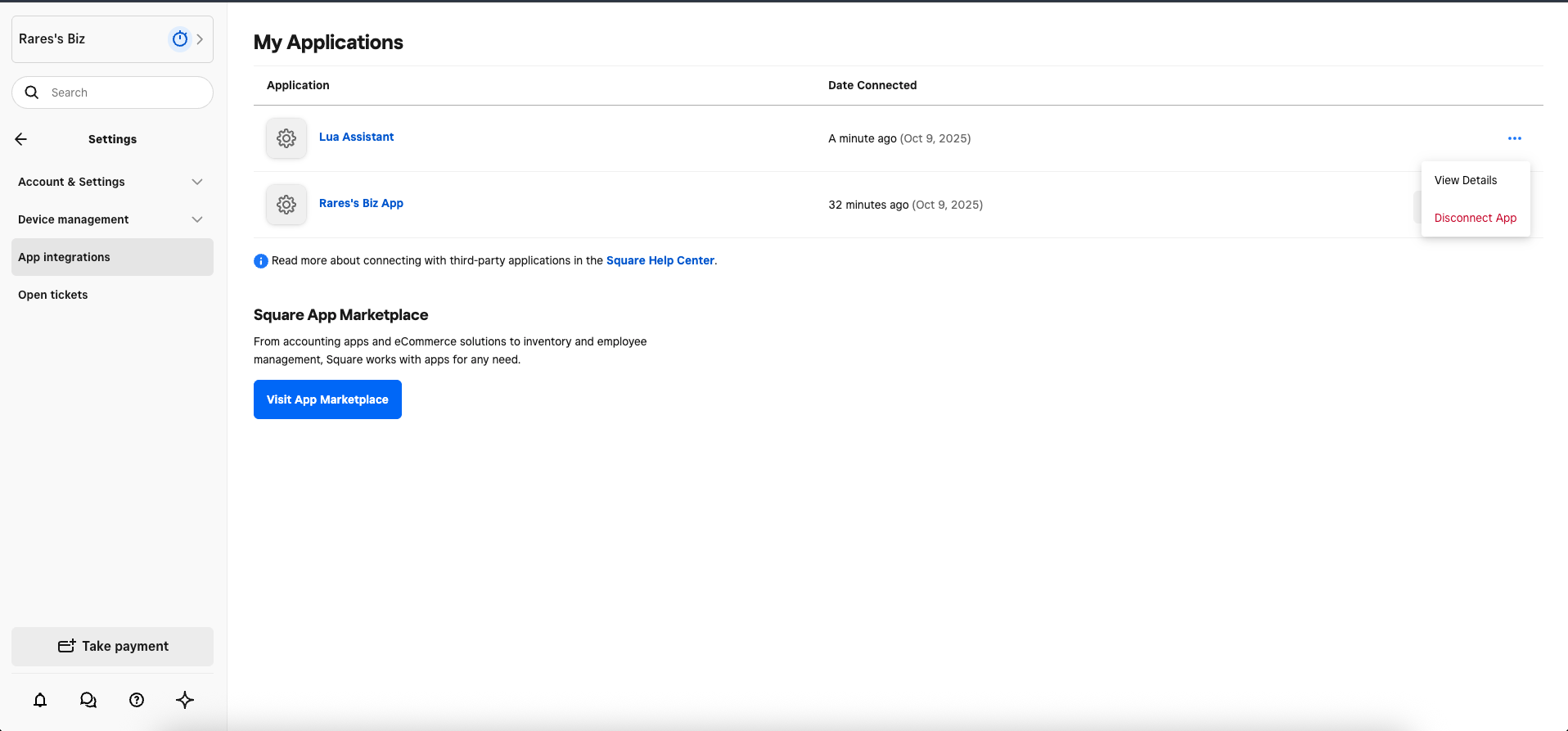
Navigate to App Integrations
Click on Settings in the left sidebar Select App Integrations from the
settings menu
Screenshot: Square Settings showing App Integrations section with Lua
Assistant listed

3
Find Lua Assistant
Scroll through your connected apps to find “Lua Assistant” or “Lua”
4
Disconnect App
Click the three dots (⋮) on the right side of the Lua Assistant row
Select “Disconnect App” from the dropdown menu Confirm the disconnection
when prompted
Want to reconnect? Just go through the integration
setup process again. All your Lua agent configuration is
preserved.
Real-World Examples
- Coffee Shop
- Boutique Clothing
- Restaurant
The Daily Grind Coffee“We use Square for our POS and online ordering. Adding Lua was a game-changer - customers can now order ahead via WhatsApp, ask about our menu, and even purchase our coffee beans and merchandise. Our AI handles 100+ daily conversations, and sales from WhatsApp alone increased 40%.”What they sell: Coffee, pastries, merchandise
Channels: WhatsApp, Website widget
Troubleshooting
Integration failed or shows error
Common causes:
- Square account not fully set up - Ensure you’ve completed Square onboarding
- Missing permissions - Try disconnecting and reconnecting with all permissions granted
- Browser issues - Clear cache or try a different browser
- Multiple browser tabs - Close other Square auth tabs
- Business not selected - If you have multiple locations, ensure you selected one
Agent can't find my products
Check: 1. Products are published in Square (not in draft mode) 2. Products
have inventory assigned 3. Square catalog sync is complete (can take a few
minutes) 4. Integration permissions include “Items and Inventory” 5. Try
searching with exact product names first Test: In Lua admin, verify your
Square catalog is visible
Wrong business connected
If you selected the wrong Square location: 1. Go to Square Settings → App
Integrations 2. Disconnect Lua Assistant 3. Restart integration at
auth.heylua.ai/square/auth 4. Select the
correct business this time
Checkout links not working
Requirements for Square checkouts: 1. Square Payments enabled 2. Products
have prices set 3. Online payment processing activated 4. Business
verification complete Alternative: Use Square invoices if checkout links
aren’t available
Agent says 'out of stock' incorrectly
Check Square inventory: 1. Verify stock levels in Square Dashboard 2.
Ensure inventory tracking is enabled for the product 3. Check if product
variations have separate stock 4. Allow a few minutes for inventory sync after
updates
Multiple locations not working properly
For multi-location Square accounts:Currently, each Lua agent connects to one Square location. To serve multiple locations:
- Create separate Lua agents for each location
- Connect each agent to its respective Square location
- Use location-specific channels or routing
Best Practices
Organize Your Square Catalog
For better AI performance:
- ✅ Use clear, descriptive product names
- ✅ Add detailed descriptions
- ✅ Include product images
- ✅ Use categories and tags
- ✅ Set accurate inventory levels
- ✅ Keep pricing up to date
Monitor Performance
Monitor Performance
Track your AI commerce assistant: 1. In Lua Admin: - Conversation
metrics - Most requested products - Cart conversion rates - Drop-off points 2.
In Square Dashboard: - Sales attributed to online channels - Average order
value - Customer acquisition costs 3. Optimize based on data: - Identify
popular products to feature - Improve agent responses for common questions -
Adjust product descriptions based on searches
Handle Edge Cases Gracefully
Prepare your agent for:
- Out of stock situations → Offer alternatives
- Large orders → Confirm stock and offer bulk pricing
- Special requests → Collect details and offer callback
- Refunds/Returns → Direct to appropriate channel
Pricing & Square Plans
The Lua integration works with all Square plans:- ✅ Square Free - Basic POS
- ✅ Square Plus ($29/month) - Advanced features
- ✅ Square Premium ($69+/month) - Multi-location, advanced features
Next Steps
Connect Square Now
Start integration in 5 minutes
E-commerce Demo
See complete shopping assistant
Configure Channels
Add WhatsApp, Instagram, Facebook
Test Your Agent
Test Square integration locally
Need Help?
Having trouble with Square integration? Email us at [email protected] or
check the troubleshooting section above.