

The flow in five steps
- The end user asks the agent to connect their account. For example, “connect my Linear”.
- The agent sends a link. The end user opens it and approves access at the provider.
-
The provider sends them to a page that shows a code. Lua hosts this page at
https://heylua.ai/oauth/code. It shows the code with a copy button.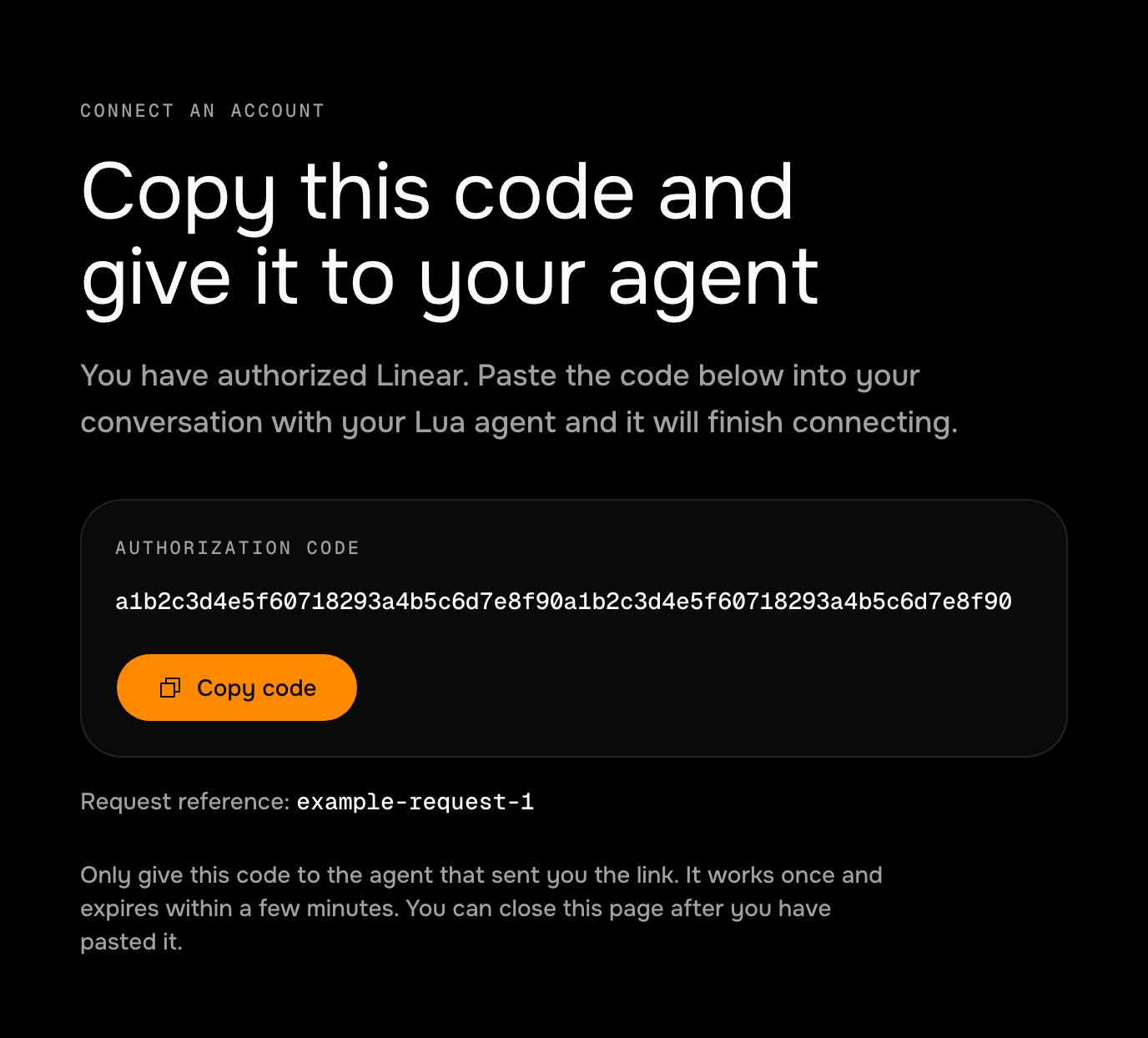
The page the end user lands on after approving. They copy the code and paste it to the agent.
- The end user pastes the code into the chat. The agent exchanges it for a token and stores it.
- The connection looks after itself. A scheduled job refreshes the token before it expires. If it can’t, the agent asks the end user to connect again.
lua-linear-oauth. Every code block on this page is a file from it.
Before you begin
- A skill on the agent to hold the tools (Add a tool to a skill).
- An OAuth application at the provider. For Linear: Settings › API › OAuth applications.
1
Register the callback URL
The provider redirects the end user to your callback URL with Providers compare the redirect URI character for character, in the authorize link and again in the token exchange, so keep one value and read it from the environment.
?code=…&state=…. Lua hosts a page for this at https://heylua.ai/oauth/code, pictured above: it shows the code with a copy button, shows state as a request reference, and sends the code nowhere. Add ?provider=<name> and the page names the service.In the Linear application, add this callback URL exactly:2
Store the client credentials
The client secret belongs in the agent’s environment, never in source.
lua env sandbox writes .env for local runs; production reads only what lua env production set (About environments).3
Add the OAuth helper
One module owns the whole exchange: building the link, swapping a code or a refresh token for tokens, and storing them. Each end user has one entry in a Three rules in this file matter for any provider:
Data collection, keyed by their Lua user ID; expiresAt is stored in milliseconds so the job can filter on it.src/lib/linear-oauth.ts
- Only
invalid_grantends a link. A timeout, a 5xx, or a rate limit leaves the stored tokens alone, because they are still good. - Store the refresh token from every response. Linear and GitHub rotate it: the old one stops working once the new one is issued.
- A connect link is single-use and short-lived. The stored
stateis cleared on success, so a pasted code can’t be replayed.
4
Add the tools
connect_linear starts a link and finish_linear_connect completes it. Both take the end user from User.get(), never from a tool argument, so one end user can’t link or read another’s account.src/skills/tools/ConnectLinearTool.ts
src/skills/tools/FinishLinearConnectTool.ts
needsRelink instead of throwing, so the model knows to send a new link.src/skills/tools/ListLinearTeamsTool.ts
5
Tell the model how to run the flow
The skill’s
context is what makes the agent send the link, wait for the code, and recover when a link has lapsed (Write skill context).src/skills/linear.skill.ts
6
Keep the tokens alive with a job
A Linear access token lasts 24 hours. This job runs every 6 hours and refreshes every token with less than 12 hours left. When Linear refuses a refresh token, the helper has already marked the entry A declared job has no current end user, so it reaches each one with
relink_required, and the job tells that end user once; because the job only reads connected entries, it never messages them again.src/jobs/LinearTokenKeepaliveJob.ts
User.get(userId) and the ID stored on the entry (Execution contexts). The message asks the end user to reply instead of carrying a link: a connect link is valid for 10 minutes, and the agent issues a fresh one when they answer.user.send() reaches WhatsApp, Messenger, Instagram, a Teams personal chat, MessageBird, SMS, and the web widget. For Slack or email, or to choose the channel yourself, use Channels.send. An end user the job can’t reach is still covered: their next request to a Linear tool answers needsRelink, and the agent sends a link in the conversation.7
Register the skill and the job
Only primitives referenced from The fourth tool is
LuaAgent are compiled.src/index.ts
Output
disconnect_linear, shown under Let the end user unlink.8
Try it locally
lua test runs a tool on your machine as you, with the values from .env; the calls to Linear and the writes to Data are real.url it returns, approve, copy the code from the page, and finish the link within 10 minutes:finish_linear_connect returns connected and tokenValidUntil, and list_linear_teams returns your teams. The job returns { checked: 0, refreshed: 0, relinkRequired: 0, failed: 0 } while the token still has more than 12 hours left.9
Release
Set the production values, then push, create a version, and promote it (Release an agent to production).
10
Verify
Ask the live agent to link Linear, follow the link, paste the code, and ask for your teams. Then run the job once and read its result.
Result: shows the four counters. failed above zero means Linear was unreachable for those entries and the next run retries them; relinkRequired counts the end users who were asked to link again.Where the tokens live
Tokens are stored in thelinear-connections collection. Data is readable by any credential that holds knowledge:read on the agent (Credentials), and collections are shared by the sandbox and production, so treat that scope like access to the accounts themselves. Two habits keep a token from spreading further: return only what the reply needs from a tool, because a tool result goes to the model, and never console.log a token, because log output is stored as written (Security and data).
Options you may need
Use GitHub or another provider
The helper changes in three places: the URLs, the authorize parameters, and how long a token lasts. Set the job’s schedule andREFRESH_AHEAD_MS from the access token’s lifetime, so the job runs at least twice within it.
GitHub’s token endpoint answers in JSON only when the request sends
Accept: application/json, which the helper already does. A GitHub refresh token that has passed its 6 months is refused like any other dead one, and the end user links again.
Let the end user unlink
Revoke at the provider, then delete the entry, so a copied token stops working too.src/skills/tools/DisconnectLinearTool.ts
Skip the copy and paste
Point the provider’s callback at a webhook of your own instead of the code page. The webhook readscode and state from the query string, finds the entry whose stored state matches, and calls the same exchange. The end user then only has to approve; the state lookup is what ties the callback to the right person, so keep it single-use and short-lived.
If it isn’t working
The provider shows a redirect_uri error instead of the consent screen
The provider shows a redirect_uri error instead of the consent screen
Cause The
redirect_uri in the link isn’t one of the application’s callback URLs, character for character; the ?provider= query counts. Fix Copy the registered URL into LINEAR_REDIRECT_URI unchanged.finish_linear_connect answers 'Linear rejected that code'
finish_linear_connect answers 'Linear rejected that code'
Cause The code was already used, has expired, or the token exchange sent a different
redirect_uri from the authorize link. Fix Ask the agent for a new link and paste the new code straight away; check that both steps read the same LINEAR_REDIRECT_URI.finish_linear_connect answers 'No connect link is outstanding'
finish_linear_connect answers 'No connect link is outstanding'
Cause The code came from a link that was already completed, or the link was created for a different end user. Fix Start again with
connect_linear in the same conversation.An end user was cut off without being told
An end user was cut off without being told
Cause
user.send() could not reach their last channel, such as Slack. Fix Send the relink message with Channels.send on a channel you choose; the agent also sends a link the next time they ask for something that needs Linear.Tokens stop working right after a refresh
Tokens stop working right after a refresh
Cause Two refreshes used the same refresh token, and the second one’s result was stored over the first. Fix Keep the job’s refresh window well ahead of the in-tool refresh, as in this guide, so the job is normally the only one refreshing.
Next steps
lua-linear-oauth example
The full project from this guide, ready to clone and run.
Call your API from a tool
Timeouts, retries, and keys in the environment.
Schedule a recurring job
Schedules, retries, and running a job by hand.
Identify users
The end user’s ID and record, inside and outside a conversation.
About integrations
When the platform should hold the credential instead.