Put the Lua chat widget on any page with one script tag and talk to your production agent from the browser
After this quickstart, end users on your site open a chat button and talk to your agent in production. You need an agent that is live in production (see Release an agent) and its agent ID, the agentId in lua.skill.yaml (see Project structure). The widget is a hosted script; there is no npm package to install.
1
Dashboard: allow your domain
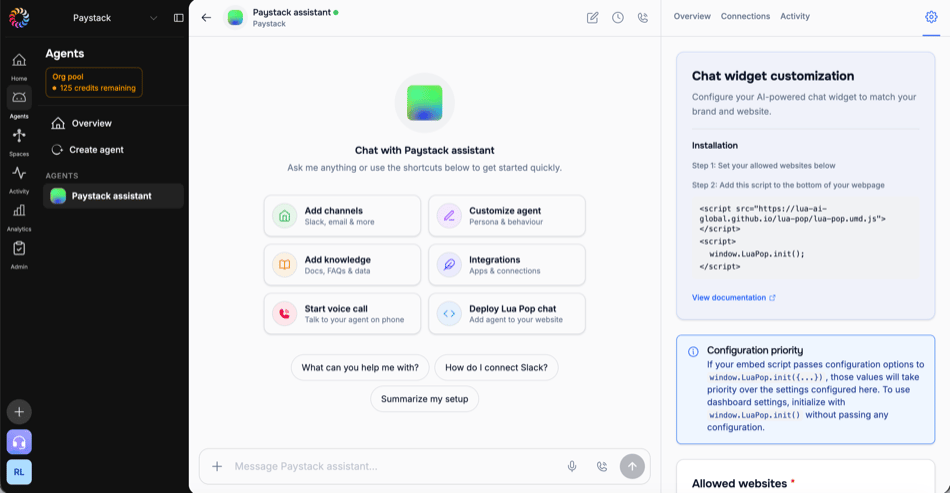
In the admin dashboard, open the agent, select the Settings gear at the right end of its tab bar, then Chat widget. Under Allowed websites, add each domain that loads the widget, for example www.example.com, then save with Create channel (Update configuration when the channel exists).The widget looks up admin dashboard settings by the hostname it loads on. A domain that isn’t listed gets none, and development hosts (localhost, 127.0.0.1, private IP addresses, and hosts ending in .local, .localhost, .test, .example, or .invalid) never do. Inline options work everywhere, including localhost, so this step only matters when the admin dashboard should control appearance: on a listed domain, window.LuaPop.init() with no arguments uses the admin dashboard settings alone, and anything you pass inline overrides them.
The Chat widget page: allowed websites, the install snippet, and the appearance settings
2
Code: add the script
Paste both tags before the closing </body> tag, with your agent ID.
Pass environment: "production" whenever you pass any option. The widget infers it only when admin dashboard settings are found for the domain; otherwise its built-in fallback points at an internal platform where your agent does not exist.
3
Browser: send a message
Load the page. A Chat with us button appears in the bottom-right corner; click it and send a message. The reply streams in from the production agent, with the same persona and skills that answer on every other channel, and the conversation resumes on the next visit from the same browser. The widget has no sandbox mode: to try unreleased code, use lua chat (see Test an agent before you release).
In the browser console, window.LuaPop.config.agentId prints your agent ID and window.LuaPop.config.environment prints production. If the button is missing, see Troubleshoot the widget.