> ## Documentation Index
> Fetch the complete documentation index at: https://docs.heylua.ai/llms.txt
> Use this file to discover all available pages before exploring further.
# List-Item Component
> Display structured lists of products, rooms, menu items, or articles
## Overview
The **List-Item** component displays structured information in a visually appealing format across all channels.
Products, hotel rooms, menu items, articles, search results - any list of options
## Format
```
::: list-item

# Item Title
Brief summary of the item (price, availability, key details — max ~40 words).
:::
```
The title must be a `# ` line (hash **followed by a space**). There is no separate subheading — put the price, stock, or other key details at the start of the description.
## Requirements
Each item must have a unique title
Maximum 10 items per response
Include when available
\~40 words max per summary
## Complete Examples
### E-commerce Product
```
::: list-item

# UltraBook Pro Laptop
$1,299.00 · In Stock. Professional-grade laptop with 16GB RAM, 512GB SSD, and a stunning 14" Retina display. Perfect for developers and content creators. Free 2-day shipping.
:::
```
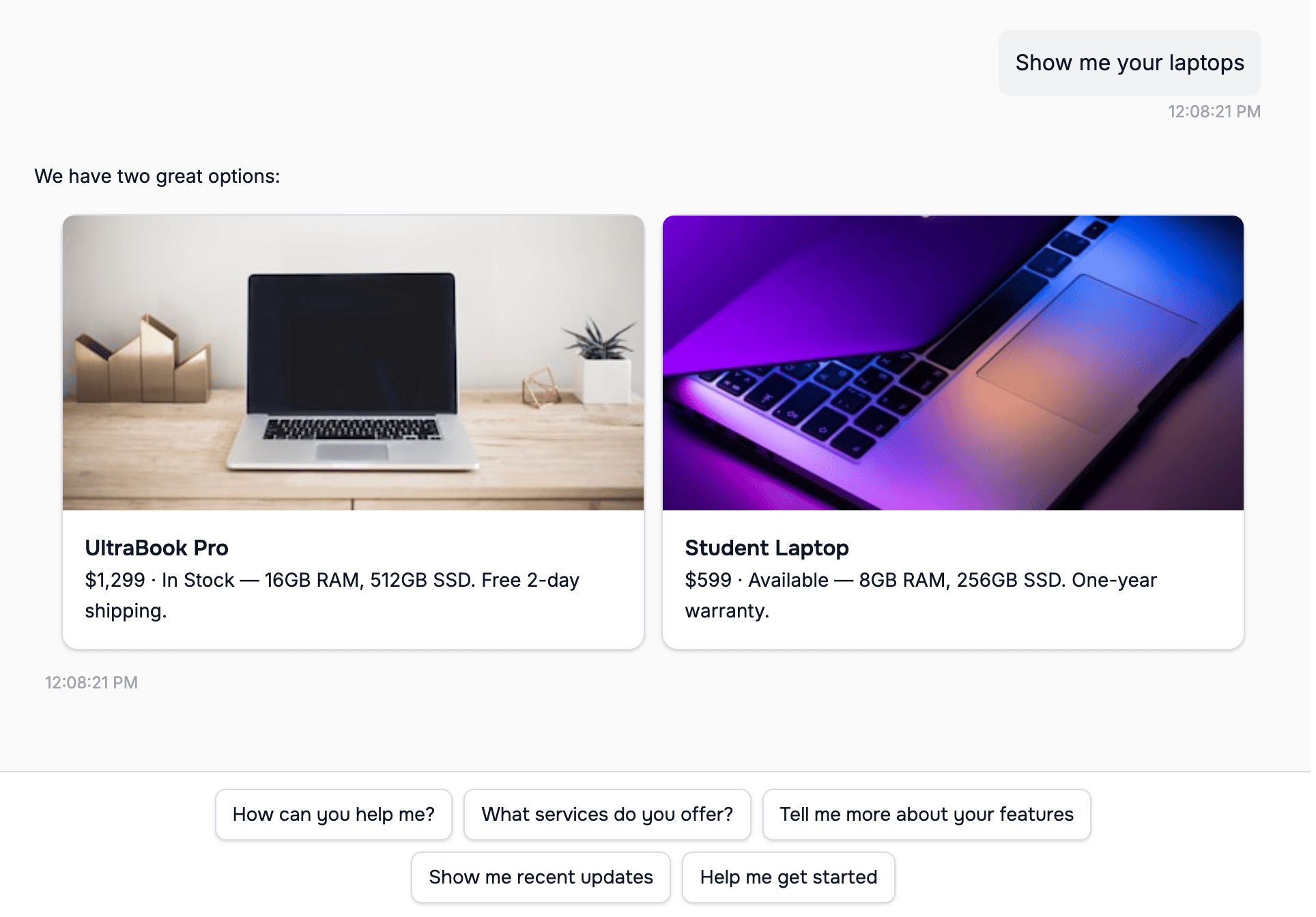 *List-items rendered in the Lua Pop web widget.*
### Hotel Room
```
::: list-item

# Deluxe Ocean View Suite
$250/night · 3 rooms available. Spacious suite with king bed, private ocean-facing balcony, and modern amenities. Includes complimentary breakfast, WiFi, and parking. Maximum 2 guests.
:::
```
### Restaurant Menu Item
```
::: list-item

# Chef's Seafood Linguine
$24.99 · Available tonight. Handmade linguine with fresh seafood, cherry tomatoes, and basil in a white wine sauce. Served with garlic bread. Gluten-free option on request.
:::
```
## How to Configure
### In Persona
```yaml theme={null}
persona: |
When showing products, ALWAYS use list-item format:
::: list-item

# Product Name
$Price · Stock status. Product description here.
:::
Format each product individually. Maximum 10 products per response.
```
### In Skill Context
```typescript theme={null}
const ecommerceSkill = new LuaSkill({
context: `
When search_products returns results, format each as:
::: list-item

# product.name
$product.price · product.stockStatus. product.description
:::
Always include image if available.
`
});
```
## Best Practices
```
✅ Good:
# Deluxe Ocean View
# Standard Garden View
❌ Bad:
# Room Option
# Room Option
```
There's no subheading — open the description with price, availability, or other key details.
```
✅ Good:
# Deluxe Ocean View
$250/night · Available. King bed, private balcony.
❌ Bad:
# Deluxe Ocean View
A room.
```
```
✅ Good: ~40 words with key features
❌ Bad: 200 word essay
```
* High resolution
* Direct image URLs
* Web-accessible (HTTPS)
* Representative of item
## Next Steps
Add interactive buttons after lists
Add formatting instructions
*List-items rendered in the Lua Pop web widget.*
### Hotel Room
```
::: list-item

# Deluxe Ocean View Suite
$250/night · 3 rooms available. Spacious suite with king bed, private ocean-facing balcony, and modern amenities. Includes complimentary breakfast, WiFi, and parking. Maximum 2 guests.
:::
```
### Restaurant Menu Item
```
::: list-item

# Chef's Seafood Linguine
$24.99 · Available tonight. Handmade linguine with fresh seafood, cherry tomatoes, and basil in a white wine sauce. Served with garlic bread. Gluten-free option on request.
:::
```
## How to Configure
### In Persona
```yaml theme={null}
persona: |
When showing products, ALWAYS use list-item format:
::: list-item

# Product Name
$Price · Stock status. Product description here.
:::
Format each product individually. Maximum 10 products per response.
```
### In Skill Context
```typescript theme={null}
const ecommerceSkill = new LuaSkill({
context: `
When search_products returns results, format each as:
::: list-item

# product.name
$product.price · product.stockStatus. product.description
:::
Always include image if available.
`
});
```
## Best Practices
```
✅ Good:
# Deluxe Ocean View
# Standard Garden View
❌ Bad:
# Room Option
# Room Option
```
There's no subheading — open the description with price, availability, or other key details.
```
✅ Good:
# Deluxe Ocean View
$250/night · Available. King bed, private balcony.
❌ Bad:
# Deluxe Ocean View
A room.
```
```
✅ Good: ~40 words with key features
❌ Bad: 200 word essay
```
* High resolution
* Direct image URLs
* Web-accessible (HTTPS)
* Representative of item
## Next Steps
Add interactive buttons after lists
Add formatting instructions