> ## Documentation Index
> Fetch the complete documentation index at: https://docs.heylua.ai/llms.txt
> Use this file to discover all available pages before exploring further.
# Documents Component
> Send downloadable files and attachments to users
## Overview
The **Documents** component sends downloadable files to users — PDFs, contracts, invoices, images, and any other file type. Each document displays as a clickable card with a filename and opens in a new tab.
## Format
```
::: documents
[Display Name](https://url-to-file.pdf) filename:filename.pdf mime:application/pdf
:::
```
You can include multiple files in a single block:
```
::: documents
[Display Name 1](https://url-to-file1.pdf) filename:file1.pdf mime:application/pdf
[Display Name 2](https://url-to-file2.docx) filename:file2.docx mime:application/vnd.openxmlformats-officedocument.wordprocessingml.document
:::
```
### Fields
| Field | Description |
| ---------------- | -------------------------------------------------------- |
| `[Display Name]` | The label shown to the user on the file card |
| `(url)` | Direct URL to the file (use the Lua CDN for uploads) |
| `filename:` | The actual filename with extension (e.g. `contract.pdf`) |
| `mime:` | The MIME type of the file (e.g. `application/pdf`) |
## Example
```
::: documents
[Loan Agreement](https://cdn.heylua.ai/2a46d577-77d1-490a-9148-b11243000da8.pdf) filename:loan_agreement.pdf mime:application/pdf
[Terms & Conditions](https://cdn.heylua.ai/5f32c891-aa2d-41bc-9e12-c33410000ec9.pdf) filename:terms_and_conditions.pdf mime:application/pdf
:::
```
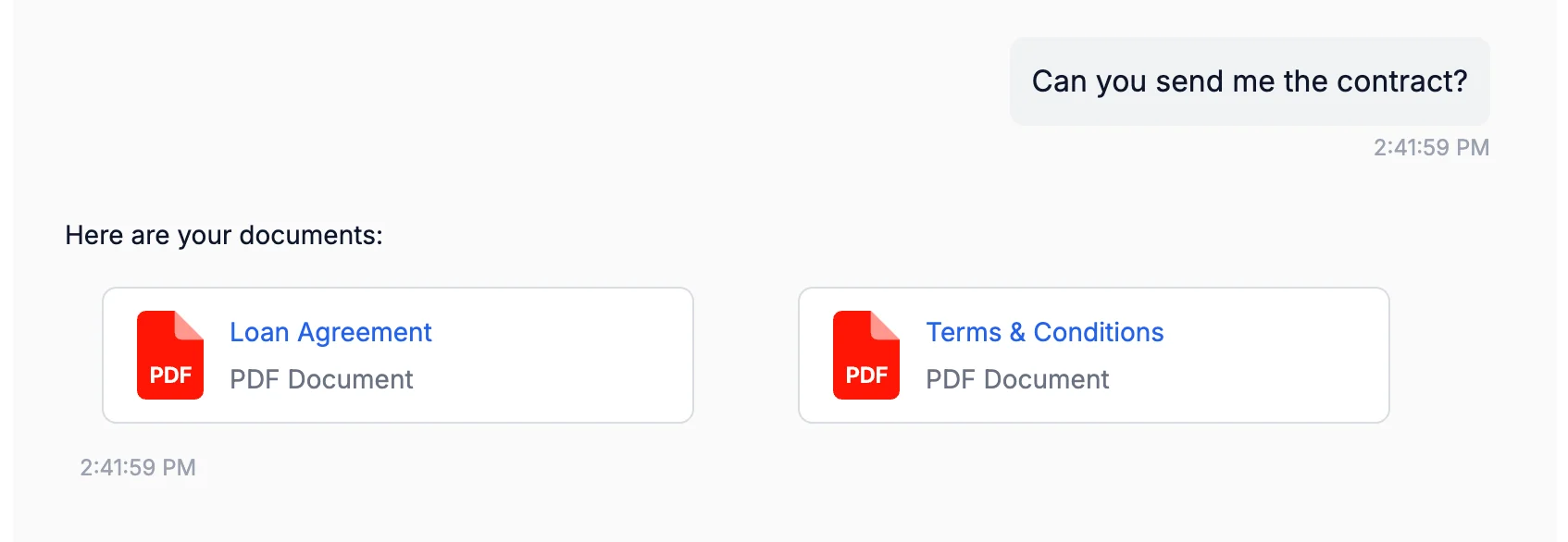 *Document cards rendered in the Lua Pop web widget.*
## Common MIME Types
| File Type | MIME Type |
| ------------- | ------------------------------------------------------------------------- |
| PDF | `application/pdf` |
| Word (.docx) | `application/vnd.openxmlformats-officedocument.wordprocessingml.document` |
| Excel (.xlsx) | `application/vnd.openxmlformats-officedocument.spreadsheetml.sheet` |
| PNG image | `image/png` |
| JPEG image | `image/jpeg` |
| CSV | `text/csv` |
## Configure in Persona
```typescript theme={null}
persona: `
After completing a loan application, send the agreement documents using:
::: documents
[Loan Agreement](url) filename:loan_agreement.pdf mime:application/pdf
:::
Always confirm the user has received the documents.
`
```
## Upload Files with the CDN
Use the Lua CDN API to upload files before referencing them in the documents component. The CDN returns a permanent URL you can include in the block.
Upload files and get permanent URLs
## Best For
* Loan agreements and contracts
* Invoices and receipts
* Policy documents
* Onboarding packets
* Reports and summaries
* Any user-facing file download
Next: Payment links
*Document cards rendered in the Lua Pop web widget.*
## Common MIME Types
| File Type | MIME Type |
| ------------- | ------------------------------------------------------------------------- |
| PDF | `application/pdf` |
| Word (.docx) | `application/vnd.openxmlformats-officedocument.wordprocessingml.document` |
| Excel (.xlsx) | `application/vnd.openxmlformats-officedocument.spreadsheetml.sheet` |
| PNG image | `image/png` |
| JPEG image | `image/jpeg` |
| CSV | `text/csv` |
## Configure in Persona
```typescript theme={null}
persona: `
After completing a loan application, send the agreement documents using:
::: documents
[Loan Agreement](url) filename:loan_agreement.pdf mime:application/pdf
:::
Always confirm the user has received the documents.
`
```
## Upload Files with the CDN
Use the Lua CDN API to upload files before referencing them in the documents component. The CDN returns a permanent URL you can include in the block.
Upload files and get permanent URLs
## Best For
* Loan agreements and contracts
* Invoices and receipts
* Policy documents
* Onboarding packets
* Reports and summaries
* Any user-facing file download
Next: Payment links