> ## Documentation Index
> Fetch the complete documentation index at: https://docs.heylua.ai/llms.txt
> Use this file to discover all available pages before exploring further.
# Actions Component
> Interactive buttons and quick replies
## Overview
The **Actions** component presents clickable action buttons that users can tap to take next steps.
Call-to-action buttons, quick replies, navigation options after showing information
## Format
```
::: actions
- Action Label 1
- Action Label 2
- Action Label 3
:::
```
## Requirements
* ✅ Maximum **10 actions**
* ✅ Clear, action-oriented language
* ✅ Only actions your agent can handle
* ✅ Most relevant first
## Examples
### After Product Listing
```
::: actions
- Add to Cart
- View Details
- Compare Products
- Check Store Availability
- Save for Later
:::
```
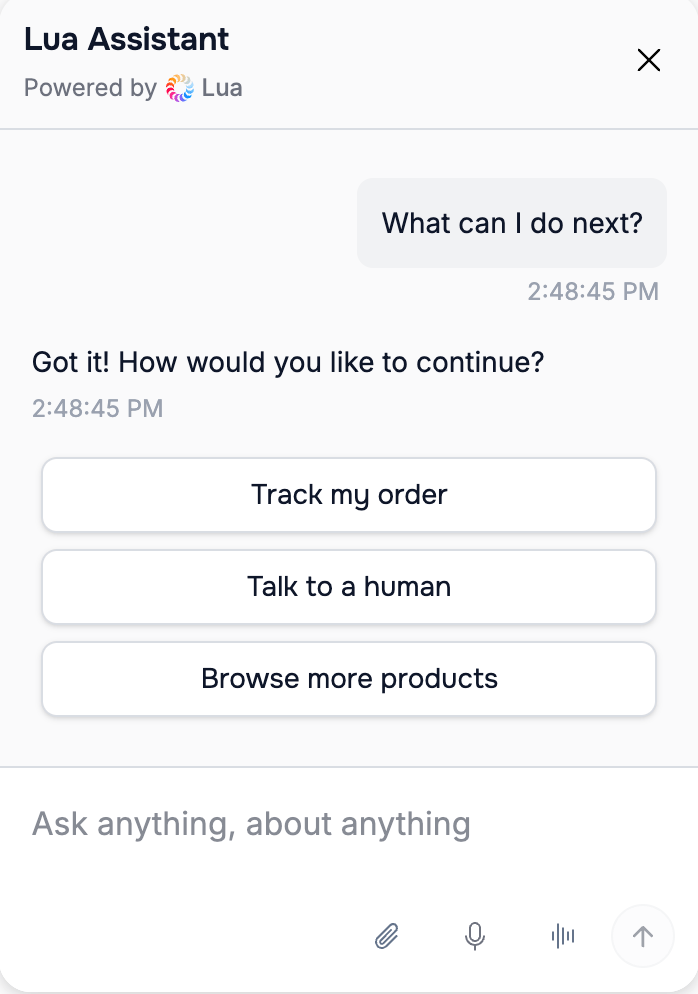 *Action buttons rendered in the Lua Pop web widget.*
### After Hotel Rooms
```
::: actions
- Book This Room
- See More Photos
- Check Other Dates
- View Amenities
- Get Directions
:::
```
### After Support Article
```
::: actions
- Mark as Solved
- Still Need Help
- Read Related Articles
- Contact Human Agent
:::
```
## How to Configure
```typescript theme={null}
persona: `
After showing options to users, ALWAYS provide relevant actions:
::: actions
- [Primary action]
- [Secondary action]
- [Alternative action]
:::
Examples:
- After products: "Add to Cart", "View Details"
- After rooms: "Book Now", "See Photos"
- After articles: "Read More", "Share"
`
```
## Best Practices
* Use verbs: "Book", "View", "Check"
* Be specific: "Add to Cart" not "Continue"
* Limit to 5-7 for best UX
* Order by importance
## Next Steps
Learn about displaying URLs
*Action buttons rendered in the Lua Pop web widget.*
### After Hotel Rooms
```
::: actions
- Book This Room
- See More Photos
- Check Other Dates
- View Amenities
- Get Directions
:::
```
### After Support Article
```
::: actions
- Mark as Solved
- Still Need Help
- Read Related Articles
- Contact Human Agent
:::
```
## How to Configure
```typescript theme={null}
persona: `
After showing options to users, ALWAYS provide relevant actions:
::: actions
- [Primary action]
- [Secondary action]
- [Alternative action]
:::
Examples:
- After products: "Add to Cart", "View Details"
- After rooms: "Book Now", "See Photos"
- After articles: "Read More", "Share"
`
```
## Best Practices
* Use verbs: "Book", "View", "Check"
* Be specific: "Add to Cart" not "Continue"
* Limit to 5-7 for best UX
* Order by importance
## Next Steps
Learn about displaying URLs