> ## Documentation Index
> Fetch the complete documentation index at: https://docs.heylua.ai/llms.txt
> Use this file to discover all available pages before exploring further.
# list-item
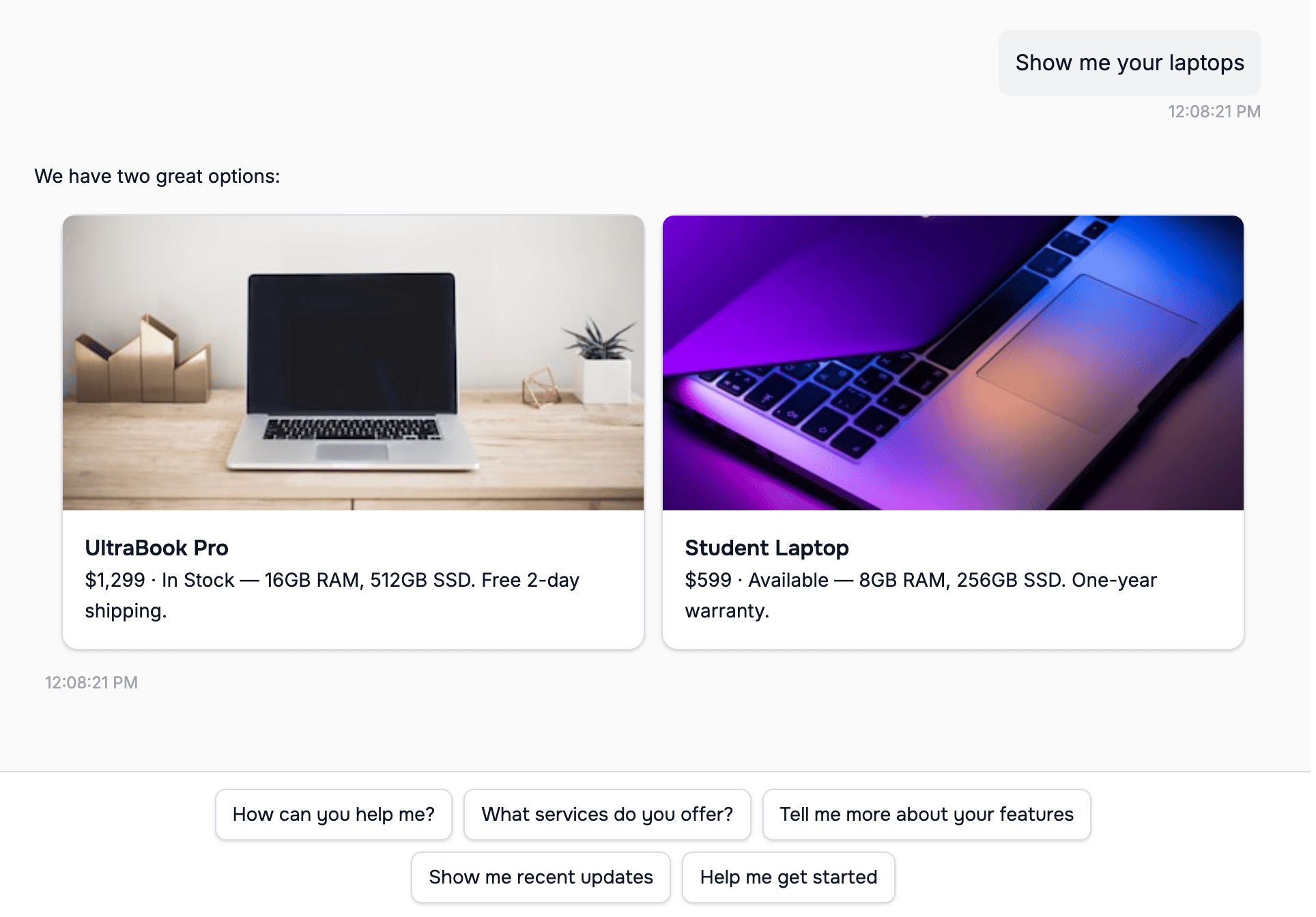
> One option as a card with an optional image, a title, a subheading, and a short description
`list-item` renders one option the end user can pick: a product, a room, a menu item, an article. Use one block per item and at most 10 per reply. The platform teaches this block on every text channel; see [Response formatting](/channels/formatting/overview) for when the model uses it on its own.
*Verified against lua-cli 3.33.0.*
## Syntax
```text theme={null}
::: list-item

# Item title
## Subheading
One or two sentences of description.
:::
```
## Fields
| Field | Required | Notes |
| --------------- | -------- | ------------------------------------------------------------- |
| `` | No | Public HTTPS URL. |
| `# Title` | Yes | Unique per reply; `#Title` without the space also parses. |
| `## Subheading` | Yes | Price, availability, or category; the model is asked for one. |
| Remaining lines | No | Description, about 40 words at most. |
## Example
A buy flow is the common shape: cards for the options, then the next step. In the skill's `context`, one sentence makes the model emit it: "When you show products, send each as a `::: list-item` with the price as the subheading, then a `::: actions` block with the next steps; once the customer has chosen, return the checkout URL from `create_checkout` in a `::: payment` block."
```text theme={null}
Two laptops match what you need.
::: list-item

# UltraBook Pro
## $1,299 · In stock
16 GB RAM, 512 GB SSD, 14-inch display. Free two-day shipping.
:::
::: list-item

# UltraBook Air
## $899 · In stock
8 GB RAM, 256 GB SSD, 13-inch display.
:::
::: actions
- Buy the UltraBook Pro
- Buy the UltraBook Air
- Compare the two
:::
```
 On WhatsApp the same reply differs in three ways: a single `list-item` is sent as bold text rather than a card, three or more `actions` become a list whose rows read **Option 1**, **Option 2**, … with your entry as the description, and the `payment` block that follows the choice is a button labeled **Pay Now** whatever label you wrote.
## Where it renders
| Channel | Behavior |
| ------------------------ | ------------------------------------------------------------------------------------------------------------------------- |
| Web widget | Cards; consecutive blocks render as one group |
| WhatsApp | Interactive list, 9 rows per message; or one image message per item with a **Select** button when every item has an image |
| Messenger, Instagram | Generic templates |
| Slack | Sections with title, subheading, and description; items with an image also get the image and a **Select** button |
| Teams | Adaptive Card containers with a **Select: title** action |
| RCS | Rich cards |
| MessageBird | List |
| Email (your own address) | Card; only description lines that start with `-` are shown |
| Email (generated inbox) | Dropped |
| iMessage | Title, subheading, and description as text, then the image |
| SMS, Front | Raw text |
On WhatsApp a list row shows the title cut at 24 characters and the subheading and description cut at 72, and a reply with more than 9 items is split across messages with a page indicator. Tapping an item sends a message that names it back to the agent: the title on Slack and Teams, the title and subheading in the web widget, and a sentence such as `I selected: *UltraBook Pro* (…)` with the title and details on WhatsApp, Messenger, and Instagram.
On the messaging channels a reply whose only block is a single `list-item` is sent as text with the title in bold, plus its image, rather than as a card; send two or more items for cards.
## See also
* [Response formatting](/channels/formatting/overview) — the per-channel matrix
* [horizontal-list-item](/channels/formatting/horizontal-list-item) — the same fields as a carousel
* [actions](/channels/formatting/actions) — follow-up buttons after a list
On WhatsApp the same reply differs in three ways: a single `list-item` is sent as bold text rather than a card, three or more `actions` become a list whose rows read **Option 1**, **Option 2**, … with your entry as the description, and the `payment` block that follows the choice is a button labeled **Pay Now** whatever label you wrote.
## Where it renders
| Channel | Behavior |
| ------------------------ | ------------------------------------------------------------------------------------------------------------------------- |
| Web widget | Cards; consecutive blocks render as one group |
| WhatsApp | Interactive list, 9 rows per message; or one image message per item with a **Select** button when every item has an image |
| Messenger, Instagram | Generic templates |
| Slack | Sections with title, subheading, and description; items with an image also get the image and a **Select** button |
| Teams | Adaptive Card containers with a **Select: title** action |
| RCS | Rich cards |
| MessageBird | List |
| Email (your own address) | Card; only description lines that start with `-` are shown |
| Email (generated inbox) | Dropped |
| iMessage | Title, subheading, and description as text, then the image |
| SMS, Front | Raw text |
On WhatsApp a list row shows the title cut at 24 characters and the subheading and description cut at 72, and a reply with more than 9 items is split across messages with a page indicator. Tapping an item sends a message that names it back to the agent: the title on Slack and Teams, the title and subheading in the web widget, and a sentence such as `I selected: *UltraBook Pro* (…)` with the title and details on WhatsApp, Messenger, and Instagram.
On the messaging channels a reply whose only block is a single `list-item` is sent as text with the title in bold, plus its image, rather than as a card; send two or more items for cards.
## See also
* [Response formatting](/channels/formatting/overview) — the per-channel matrix
* [horizontal-list-item](/channels/formatting/horizontal-list-item) — the same fields as a carousel
* [actions](/channels/formatting/actions) — follow-up buttons after a list