> ## Documentation Index
> Fetch the complete documentation index at: https://docs.heylua.ai/llms.txt
> Use this file to discover all available pages before exploring further.
# links
> One or more URLs rendered as preview cards, buttons, or suggestions
`links` presents URLs with a preview where the channel supports one: search results, documentation pages, external resources. The platform teaches this block on every text channel; see [Response formatting](/channels/formatting/overview).
*Verified against lua-cli 3.33.0.*
## Syntax
```text theme={null}
::: links


:::
```
## Fields
| Field | Required | Notes |
| -------------- | ---------------- | ------------------------------------------------------------------------------------------ |
| `` | Yes, one or more | Keep exactly this form; the messaging channels and email both parse it. Public HTTPS URLs. |
## Example
```text theme={null}
::: links


:::
```
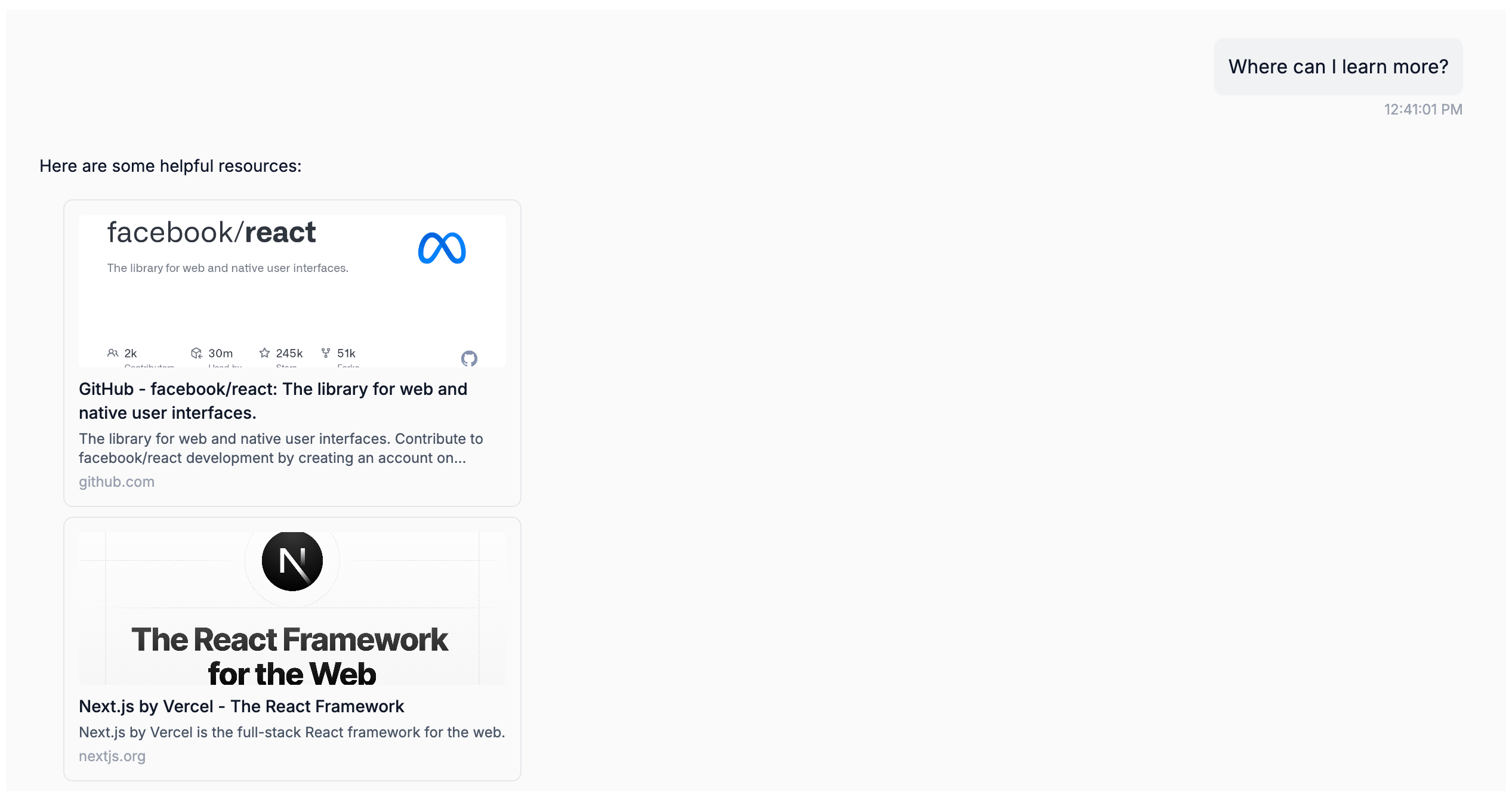 ## Where it renders
| Channel | Behavior |
| ---------------------------------------------------------- | ---------------------------------------------------------------------------------------------------- |
| Web widget | Preview cards; plain links when `disablePreviewOnLinks` is set |
| WhatsApp | One message per link with its title, description, and preview image and a **View Link** button |
| Slack | Preview sections with title, description, and a **Read more** link; a link missing either is skipped |
| Teams | **View Link** buttons under a **Related Links** heading |
| RCS | Open-URL suggestions labelled with the hostname, up to 11 shared with `actions` |
| iMessage | Rich links |
| Email (your own address) | Cards under an **Available Links:** heading |
| Messenger, Instagram, MessageBird, email (generated inbox) | Dropped; put the URL in the message text instead |
| SMS, Front | Raw text |
Only the first `::: links` block in a reply is rendered on the messaging channels. On Slack and Teams a `payment` block in the same reply doesn't affect links; it replaces `actions` only.
## See also
* [Response formatting](/channels/formatting/overview) — the per-channel matrix
* [navigate](/channels/formatting/navigate) — send the end user to a page on your own site
* [Widget configuration](/channels/web-widget/configuration) — `disablePreviewOnLinks`
## Where it renders
| Channel | Behavior |
| ---------------------------------------------------------- | ---------------------------------------------------------------------------------------------------- |
| Web widget | Preview cards; plain links when `disablePreviewOnLinks` is set |
| WhatsApp | One message per link with its title, description, and preview image and a **View Link** button |
| Slack | Preview sections with title, description, and a **Read more** link; a link missing either is skipped |
| Teams | **View Link** buttons under a **Related Links** heading |
| RCS | Open-URL suggestions labelled with the hostname, up to 11 shared with `actions` |
| iMessage | Rich links |
| Email (your own address) | Cards under an **Available Links:** heading |
| Messenger, Instagram, MessageBird, email (generated inbox) | Dropped; put the URL in the message text instead |
| SMS, Front | Raw text |
Only the first `::: links` block in a reply is rendered on the messaging channels. On Slack and Teams a `payment` block in the same reply doesn't affect links; it replaces `actions` only.
## See also
* [Response formatting](/channels/formatting/overview) — the per-channel matrix
* [navigate](/channels/formatting/navigate) — send the end user to a page on your own site
* [Widget configuration](/channels/web-widget/configuration) — `disablePreviewOnLinks`