> ## Documentation Index
> Fetch the complete documentation index at: https://docs.heylua.ai/llms.txt
> Use this file to discover all available pages before exploring further.
# flow
> A WhatsApp Flow sent as a message with a button that opens a multi-screen form inside WhatsApp
`flow` sends a [WhatsApp Flow](https://developers.facebook.com/docs/whatsapp/flows) built in WhatsApp Manager: the end user taps a button, fills in a form inside WhatsApp, and the fields come back to the agent as a message. WhatsApp only. The platform teaches this block on every channel except `web` and tells the model to use it only when it knows the channel is WhatsApp; instruct it explicitly with your Flow ID. See [Response formatting](/channels/formatting/overview).
*Verified against lua-cli 3.33.0.*
## Syntax
```text theme={null}
::: flow
flow_id=1234567890
flow_cta=Open form
body=Text shown above the button
:::
```
## Fields
| Field | Required | Notes |
| ---------- | -------- | ---------------------------------------------------------------------------------------------------- |
| `flow_id` | Yes | Flow ID from WhatsApp Manager under **Account tools** > **Flows**; only published flows can be sent. |
| `flow_cta` | Yes | Button text, at most 30 characters, no emoji. |
| `body` | No | Message body above the button; the reply text outside the block is used when omitted. |
| `header` | No | Header text above the body. |
| `footer` | No | Footer text below the body. |
| `screen` | No | Screen ID to open first; defaults to the flow's entry screen. |
Each field goes on its own line. Separators can be `=` or `:`, with or without spaces or quotes; a block written on one line is dropped because the first field swallows the rest.
## Example
```text theme={null}
Tap below to enter your verification code securely.
::: flow
flow_id=9876543210
flow_cta=Enter code
body=Your code is never shown in the chat
:::
```
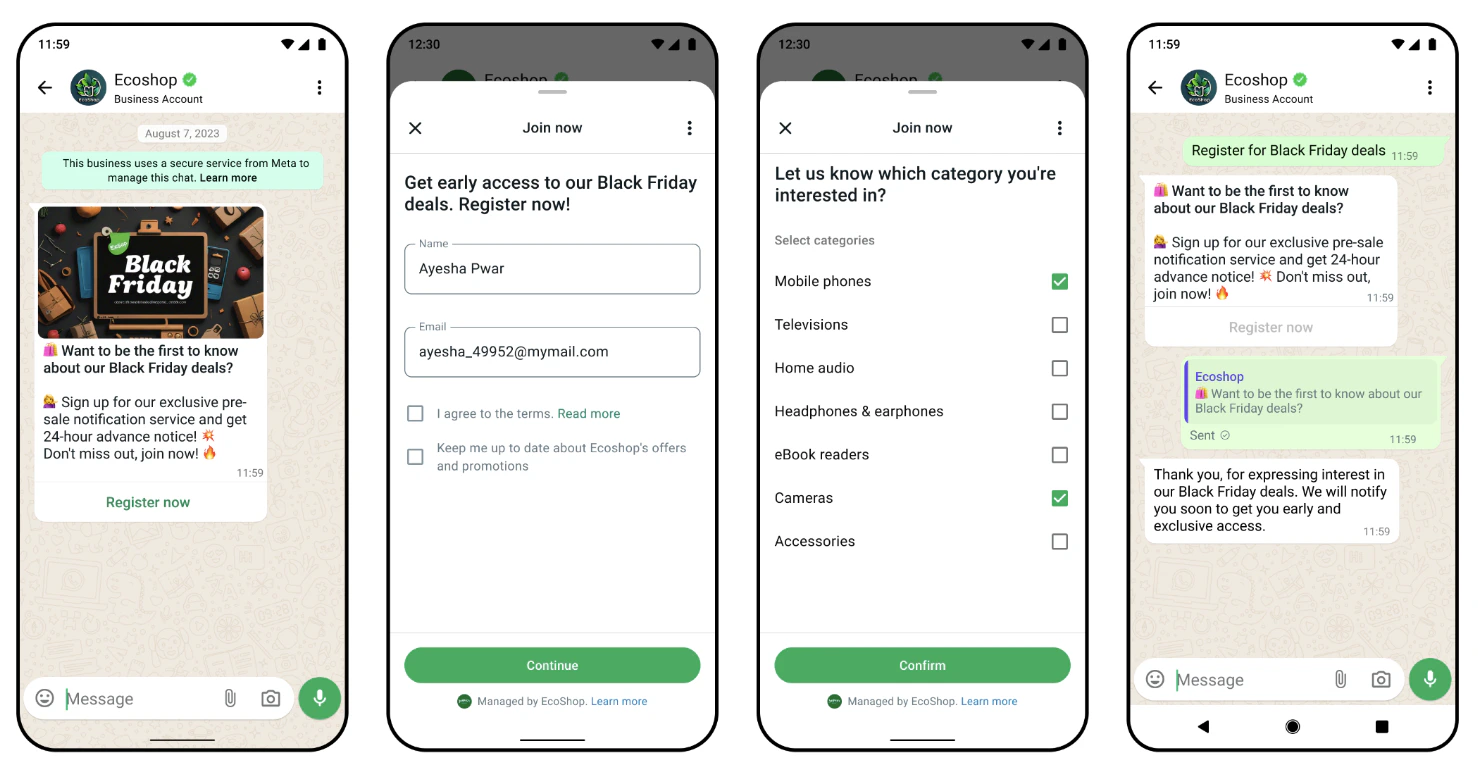 ## Where it renders
| Channel | Behavior |
| --------------------------------------------------------------------------------------- | ----------------------------------------- |
| WhatsApp | Message with a button that opens the form |
| Messenger, Instagram, Slack, Teams, RCS, iMessage, MessageBird, email (generated inbox) | Dropped |
| Web widget, email (your own address), SMS, Front, HTTP API | Raw text |
## Submitted data
When the end user submits, the agent receives a message of the form `User completed a WhatsApp Flow. Submitted data:` followed by one `- field: value` line per field. Password fields are hidden in the WhatsApp chat but still arrive in that message and are stored in the conversation; for one-time codes, validate inside the flow with a data-exchange endpoint so only the result reaches the agent.
## See also
* [Response formatting](/channels/formatting/overview) — the per-channel matrix
* [WhatsApp](/channels/whatsapp) — channel setup
* [`Lua`](/reference/sdk/lua) — `Lua.request.channel`, to send the block only on WhatsApp
## Where it renders
| Channel | Behavior |
| --------------------------------------------------------------------------------------- | ----------------------------------------- |
| WhatsApp | Message with a button that opens the form |
| Messenger, Instagram, Slack, Teams, RCS, iMessage, MessageBird, email (generated inbox) | Dropped |
| Web widget, email (your own address), SMS, Front, HTTP API | Raw text |
## Submitted data
When the end user submits, the agent receives a message of the form `User completed a WhatsApp Flow. Submitted data:` followed by one `- field: value` line per field. Password fields are hidden in the WhatsApp chat but still arrive in that message and are stored in the conversation; for one-time codes, validate inside the flow with a data-exchange endpoint so only the result reaches the agent.
## See also
* [Response formatting](/channels/formatting/overview) — the per-channel matrix
* [WhatsApp](/channels/whatsapp) — channel setup
* [`Lua`](/reference/sdk/lua) — `Lua.request.channel`, to send the block only on WhatsApp