> ## Documentation Index
> Fetch the complete documentation index at: https://docs.heylua.ai/llms.txt
> Use this file to discover all available pages before exploring further.
# documents
> Files the end user can open or download, with a label, a filename, and a MIME type
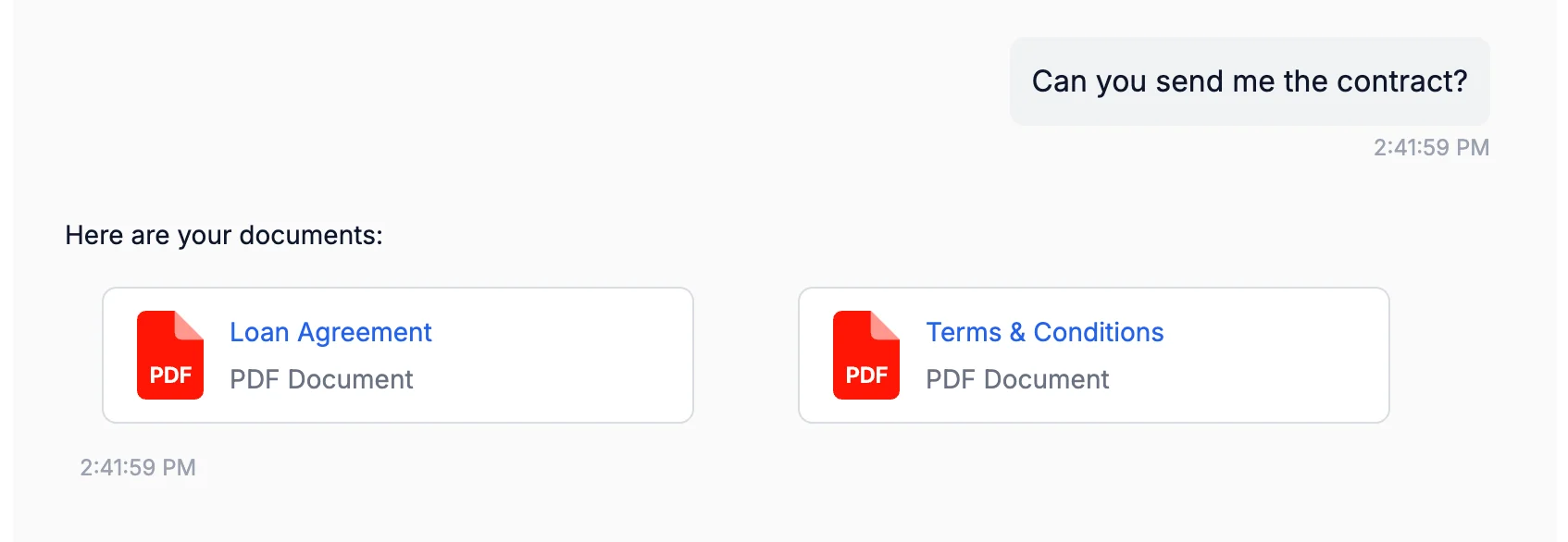
`documents` delivers files: contracts, invoices, policies, reports. The platform never teaches this block, so the model uses it only when your persona or skill context includes the syntax; see [Response formatting](/channels/formatting/overview). Upload the file first, for example with [`CDN`](/reference/sdk/cdn), and reference the URL it returns.
*Verified against lua-cli 3.33.0.*
## Syntax
```text theme={null}
::: documents
[Label](https://cdn.heylua.ai/file-id.pdf) filename:name.pdf mime:application/pdf
:::
```
## Fields
| Field | Required | Notes |
| ----------- | --------------- | ------------------------------------------------------------------ |
| `[Label]` | Yes | Text shown on the card or as the caption. |
| `(url)` | Yes | Public HTTPS URL of the file. |
| `filename:` | Web widget: yes | Name with extension, for example `contract.pdf`. |
| `mime:` | Web widget: yes | MIME type, for example `application/pdf`, `image/png`, `text/csv`. |
Put one file per line. The web widget skips a line that lacks `filename:` or `mime:`; the messaging channels accept the bare `[Label](url)` form but use both fields when present.
## Example
```text theme={null}
::: documents
[Loan Agreement](https://cdn.heylua.ai/2a46d577-77d1-490a-9148-b11243000da8.pdf) filename:loan_agreement.pdf mime:application/pdf
[Terms and Conditions](https://cdn.heylua.ai/5f32c891-aa2d-41bc-9e12-c33410000ec9.pdf) filename:terms.pdf mime:application/pdf
:::
```
 ## Where it renders
| Channel | Behavior |
| ------------------------------------ | -------------------------------------------------------------------------------------------------------------------------------------------------- |
| Web widget | File cards that open in a new tab |
| WhatsApp | Document messages |
| Teams | A **Documents** list with an **Open** button per file; in a personal chat, also a file-consent card that saves the file to the end user's OneDrive |
| RCS | File messages; video file types are sent as video |
| iMessage | Attachments, with the label as a text message |
| MessageBird | The label and URL as a text line |
| Email (generated inbox) | Attachments |
| Email (your own address), SMS, Front | Raw text |
| Messenger, Instagram, Slack | Dropped; send a plain link instead |
Only the first `::: documents` block in a reply is rendered on the messaging channels. To attach a file to email sent from your own address, send it from code with [`Channels.email.send`](/reference/sdk/channels#emailsendinput) and its `attachments` field instead of this block.
## See also
* [Response formatting](/channels/formatting/overview) — the per-channel matrix
* [`CDN`](/reference/sdk/cdn) — upload a file and get its URL
* [images](/channels/formatting/images) — pictures rather than files
## Where it renders
| Channel | Behavior |
| ------------------------------------ | -------------------------------------------------------------------------------------------------------------------------------------------------- |
| Web widget | File cards that open in a new tab |
| WhatsApp | Document messages |
| Teams | A **Documents** list with an **Open** button per file; in a personal chat, also a file-consent card that saves the file to the end user's OneDrive |
| RCS | File messages; video file types are sent as video |
| iMessage | Attachments, with the label as a text message |
| MessageBird | The label and URL as a text line |
| Email (generated inbox) | Attachments |
| Email (your own address), SMS, Front | Raw text |
| Messenger, Instagram, Slack | Dropped; send a plain link instead |
Only the first `::: documents` block in a reply is rendered on the messaging channels. To attach a file to email sent from your own address, send it from code with [`Channels.email.send`](/reference/sdk/channels#emailsendinput) and its `attachments` field instead of this block.
## See also
* [Response formatting](/channels/formatting/overview) — the per-channel matrix
* [`CDN`](/reference/sdk/cdn) — upload a file and get its URL
* [images](/channels/formatting/images) — pictures rather than files