> ## Documentation Index
> Fetch the complete documentation index at: https://docs.heylua.ai/llms.txt
> Use this file to discover all available pages before exploring further.
# Let your agent handle OAuth
> Have the agent send an end user an authorize link, exchange the code they paste back, and keep the token alive with a scheduled job
After this guide, your agent links an end user's own account on another service during a conversation: it sends an authorize link, the end user approves and pastes back a code, and a [job](/concepts/jobs) keeps the token fresh or asks them to link again. The example is Linear; [GitHub and other providers](#use-github-or-another-provider) differ only in endpoints and lifetimes. Use this when each end user brings their own account, or when you need your own OAuth application. When one account serves the whole agent, connect an [integration](/concepts/integrations) instead and the platform holds the credential for you.
## The flow in five steps
1. **The end user asks the agent to connect their account.** For example, "connect my Linear".
2. **The agent sends a link.** The end user opens it and approves access at the provider.
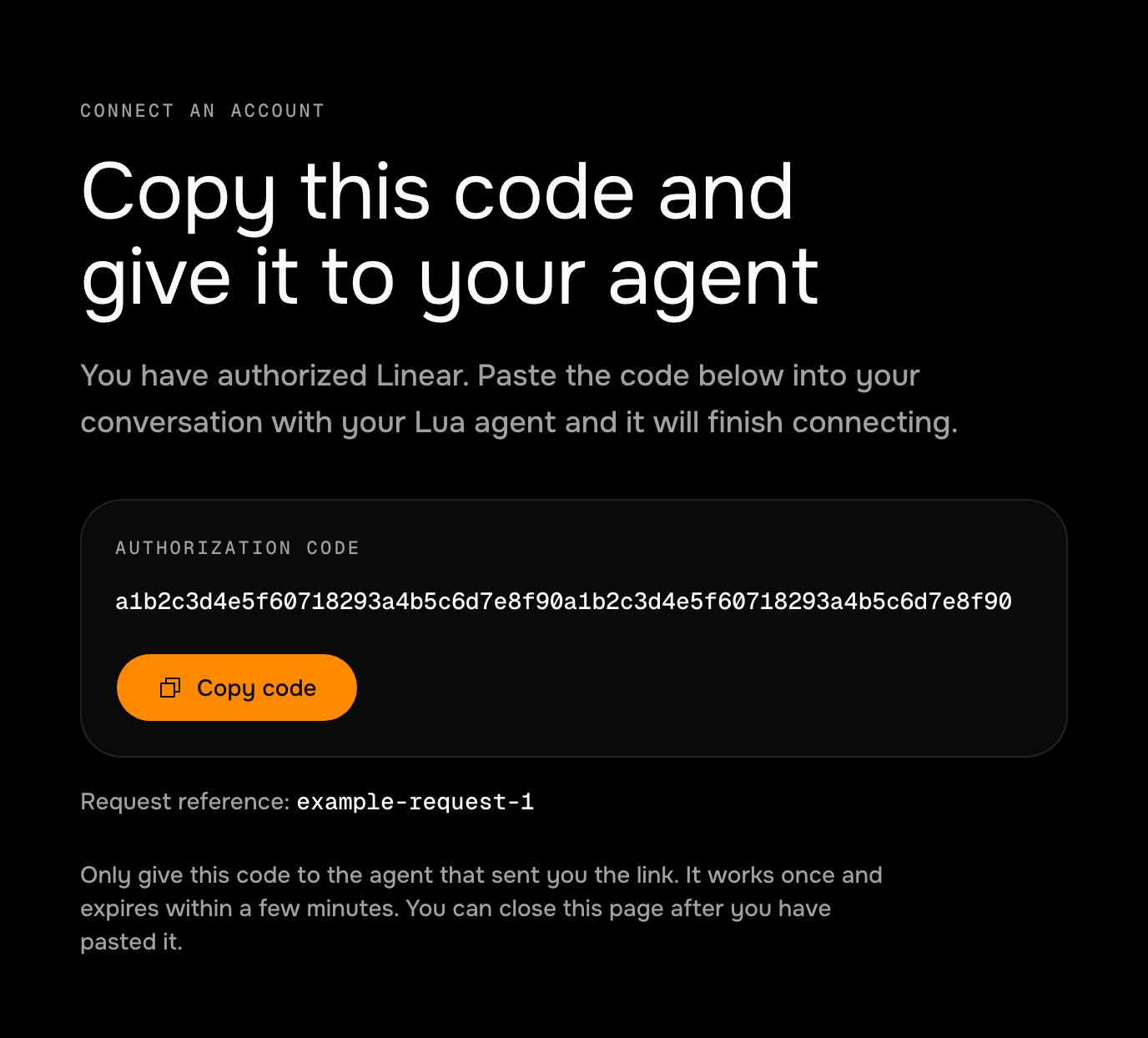
3. **The provider sends them to a page that shows a code.** Lua hosts this page at `https://heylua.ai/oauth/code`. It shows the code with a copy button.
 4. **The end user pastes the code into the chat.** The agent exchanges it for a token and stores it.
5. **The connection looks after itself.** A scheduled job refreshes the token before it expires. If it can't, the agent asks the end user to connect again.
The model sees the link and the one-time code. It never sees a token: no tool returns one. The rest of this page builds each step.
*Compiled with lua-cli 3.41.0.*
The complete project is in the examples repository: [`lua-linear-oauth`](https://github.com/lua-ai-global/lua-dev-examples/tree/master/lua-linear-oauth). Every code block on this page is a file from it.
**Before you begin**
* A skill on the agent to hold the tools ([Add a tool to a skill](/build/add-a-tool)).
* An OAuth application at the provider. For Linear: **Settings** › **API** › **OAuth applications**.
The provider redirects the end user to your callback URL with `?code=…&state=…`. Lua hosts a page for this at `https://heylua.ai/oauth/code`, [pictured above](#the-flow-in-five-steps): it shows the code with a copy button, shows `state` as a request reference, and sends the code nowhere. Add `?provider=` and the page names the service.
In the Linear application, add this callback URL exactly:
```text theme={null}
https://heylua.ai/oauth/code?provider=linear
```
Providers compare the redirect URI character for character, in the authorize link and again in the token exchange, so keep one value and read it from the environment.
The client secret belongs in the agent's environment, never in source. `lua env sandbox` writes `.env` for local runs; production reads only what `lua env production` set ([About environments](/concepts/environments)).
```bash theme={null}
lua env sandbox -k LINEAR_CLIENT_ID -v
lua env sandbox -k LINEAR_CLIENT_SECRET -v
lua env sandbox -k LINEAR_REDIRECT_URI -v "https://heylua.ai/oauth/code?provider=linear"
```
One module owns the whole exchange: building the link, swapping a code or a refresh token for tokens, and storing them. Each end user has one entry in a [`Data`](/reference/sdk/data) collection, keyed by their Lua user ID; `expiresAt` is stored in milliseconds so the job can filter on it.
```ts src/lib/linear-oauth.ts theme={null}
import { Data, env } from 'lua-cli';
// One entry per end user in this collection holds that user's Linear tokens.
// Tokens never leave this module except as the bearer header of a Linear call:
// no tool returns one, and nothing here logs one.
export const COLLECTION = 'linear-connections';
const AUTHORIZE_URL = 'https://linear.app/oauth/authorize';
const TOKEN_URL = 'https://api.linear.app/oauth/token';
const REVOKE_URL = 'https://api.linear.app/oauth/revoke';
// How long a connect link stays valid after the agent sends it.
const LINK_TTL_MS = 10 * 60_000;
// Refresh inside a tool only when the token is about to lapse; the keep-alive
// job normally refreshes hours earlier.
const EXPIRY_MARGIN_MS = 60_000;
// The fields the tools and the job filter on. Declared on every write so the
// platform keeps the indexes built.
const INDEXES = { index: ['userId', ['status', 'expiresAt']] };
export type ConnectionStatus = 'pending' | 'connected' | 'relink_required';
export interface LinearConnection {
userId: string;
status: ConnectionStatus;
/** Set while a connect link is outstanding. */
state?: string | null;
linkSentAt?: number | null;
accessToken?: string | null;
refreshToken?: string | null;
/** Epoch milliseconds, so the job can filter with $lte. */
expiresAt?: number | null;
scope?: string;
connectedAt?: string;
refreshedAt?: string;
relinkReason?: string | null;
}
export interface StoredConnection {
id: string;
data: LinearConnection;
}
/** The user has to authorize again: there is no usable refresh token. */
export class RelinkRequiredError extends Error {
constructor(message = 'The Linear connection has to be linked again') {
super(message);
this.name = 'RelinkRequiredError';
}
}
function config() {
const clientId = env('LINEAR_CLIENT_ID');
const clientSecret = env('LINEAR_CLIENT_SECRET');
const redirectUri = env('LINEAR_REDIRECT_URI');
if (!clientId || !clientSecret || !redirectUri) {
throw new Error('LINEAR_CLIENT_ID, LINEAR_CLIENT_SECRET and LINEAR_REDIRECT_URI are not set');
}
return { clientId, clientSecret, redirectUri };
}
export async function findConnection(userId: string): Promise {
const page = await Data.get(COLLECTION, { userId }, 1, 1);
const entry = page.data[0];
return entry ? { id: entry.id, data: entry.data as LinearConnection } : null;
}
async function saveConnection(userId: string, fields: Partial): Promise {
const existing = await findConnection(userId);
if (existing) await Data.update(COLLECTION, existing.id, fields, INDEXES);
else await Data.create(COLLECTION, { userId, ...fields }, INDEXES);
}
/** Start a link: remember a one-time `state` for this user and build the URL to send them. */
export async function startLink(userId: string): Promise<{ url: string; reference: string }> {
const { clientId, redirectUri } = config();
const state = crypto.randomUUID();
const existing = await findConnection(userId);
await saveConnection(userId, {
// A user who is relinking keeps `relink_required` until the new code is exchanged.
status: existing?.data.status === 'relink_required' ? 'relink_required' : 'pending',
state,
linkSentAt: Date.now(),
});
const url = new URL(AUTHORIZE_URL);
url.searchParams.set('client_id', clientId);
url.searchParams.set('redirect_uri', redirectUri);
url.searchParams.set('response_type', 'code');
url.searchParams.set('scope', 'read,write');
url.searchParams.set('actor', 'app');
url.searchParams.set('state', state);
return { url: url.toString(), reference: state };
}
interface TokenResponse {
access_token: string;
refresh_token?: string;
expires_in: number;
scope?: string;
}
// Linear answers a dead code or refresh token with `invalid_grant`. Everything
// else (timeouts, 5xx, rate limits) is temporary and must not drop the link.
async function tokenRequest(params: Record): Promise {
const { clientId, clientSecret } = config();
const res = await fetch(TOKEN_URL, {
method: 'POST',
headers: { 'Content-Type': 'application/x-www-form-urlencoded', Accept: 'application/json' },
body: new URLSearchParams({ ...params, client_id: clientId, client_secret: clientSecret }),
signal: AbortSignal.timeout(10_000),
});
if (res.ok) return (await res.json()) as TokenResponse;
const body = (await res.json().catch(() => ({}))) as { error?: string };
if (body.error === 'invalid_grant') throw new RelinkRequiredError();
throw new Error(`Linear token endpoint answered ${res.status}${body.error ? ` (${body.error})` : ''}`);
}
function tokenFields(tokens: TokenResponse): Partial {
return {
status: 'connected',
accessToken: tokens.access_token,
// Linear rotates the refresh token: each response carries the next one.
...(tokens.refresh_token ? { refreshToken: tokens.refresh_token } : {}),
expiresAt: Date.now() + tokens.expires_in * 1000,
scope: tokens.scope,
state: null,
linkSentAt: null,
relinkReason: null,
};
}
/** Finish a link with the code the user pasted. `reference` is the state shown on the code page. */
export async function finishLink(userId: string, code: string, reference?: string): Promise<{ expiresAt: number }> {
const connection = await findConnection(userId);
const pending = connection?.data;
if (!pending?.state || !pending.linkSentAt) {
throw new Error('No connect link is outstanding for this user. Send a new link first.');
}
if (Date.now() - pending.linkSentAt > LINK_TTL_MS) {
throw new Error('The connect link has expired. Send a new link.');
}
if (reference && reference !== pending.state) {
throw new Error('That code belongs to a different connect link. Send a new link.');
}
let tokens: TokenResponse;
try {
tokens = await tokenRequest({
grant_type: 'authorization_code',
code,
redirect_uri: config().redirectUri,
});
} catch (error) {
// A wrong, reused or expired code: nothing about the stored link changed.
if (error instanceof RelinkRequiredError) {
throw new Error('Linear rejected that code. Codes work once and expire quickly; send a new link.');
}
throw error;
}
const fields = tokenFields(tokens);
await saveConnection(userId, { ...fields, connectedAt: new Date().toISOString() });
return { expiresAt: fields.expiresAt as number };
}
/** Swap the refresh token for a new pair. Marks the link `relink_required` when Linear refuses it. */
export async function refreshConnection(connection: StoredConnection): Promise {
const { id, data } = connection;
if (!data.refreshToken) {
await Data.update(COLLECTION, id, { status: 'relink_required', relinkReason: 'no refresh token' }, INDEXES);
throw new RelinkRequiredError();
}
try {
const tokens = await tokenRequest({ grant_type: 'refresh_token', refresh_token: data.refreshToken });
const fields = { ...tokenFields(tokens), refreshedAt: new Date().toISOString() };
await Data.update(COLLECTION, id, fields, INDEXES);
return { ...data, ...fields };
} catch (error) {
if (error instanceof RelinkRequiredError) {
await Data.update(
COLLECTION,
id,
{ status: 'relink_required', accessToken: null, refreshToken: null, relinkReason: 'refresh token rejected' },
INDEXES
);
}
throw error;
}
}
/** A token that is valid right now, refreshing first when it is about to lapse. */
export async function getAccessToken(userId: string): Promise {
const connection = await findConnection(userId);
if (!connection || connection.data.status !== 'connected' || !connection.data.accessToken) {
throw new RelinkRequiredError('Linear is not linked for this user');
}
const { accessToken, expiresAt } = connection.data;
if (expiresAt && expiresAt - Date.now() > EXPIRY_MARGIN_MS) return accessToken;
const refreshed = await refreshConnection(connection);
return refreshed.accessToken as string;
}
/** Revoke the tokens at Linear and forget the link. */
export async function unlink(userId: string): Promise {
const connection = await findConnection(userId);
if (!connection) return false;
const token = connection.data.refreshToken ?? connection.data.accessToken;
if (token) {
// Best effort: the entry is deleted either way.
await fetch(REVOKE_URL, {
method: 'POST',
headers: { 'Content-Type': 'application/x-www-form-urlencoded' },
body: new URLSearchParams({ token }),
signal: AbortSignal.timeout(10_000),
}).catch(() => undefined);
}
await Data.delete(COLLECTION, connection.id);
return true;
}
```
Three rules in this file matter for any provider:
* Only `invalid_grant` ends a link. A timeout, a 5xx, or a rate limit leaves the stored tokens alone, because they are still good.
* Store the refresh token from every response. Linear and GitHub rotate it: the old one stops working once the new one is issued.
* A connect link is single-use and short-lived. The stored `state` is cleared on success, so a pasted code can't be replayed.
`connect_linear` starts a link and `finish_linear_connect` completes it. Both take the end user from [`User.get()`](/reference/sdk/user), never from a tool argument, so one end user can't link or read another's account.
```ts src/skills/tools/ConnectLinearTool.ts theme={null}
import { LuaTool, User } from 'lua-cli';
import { z } from 'zod';
import { startLink } from '../../lib/linear-oauth';
export default class ConnectLinearTool implements LuaTool {
name = 'connect_linear';
description =
'Create the link the current user opens to authorize Linear. ' +
'Use when they ask to connect Linear, or when another tool answers needsRelink.';
inputSchema = z.object({});
async execute() {
const user = await User.get();
if (!user) throw new Error('No end user in this conversation');
const { url, reference } = await startLink(user._luaProfile.userId);
return {
url,
reference,
validForMinutes: 10,
nextStep: 'Send the user the url. They approve in Linear, copy the code the page shows, and paste it here.',
};
}
}
```
```ts src/skills/tools/FinishLinearConnectTool.ts theme={null}
import { LuaTool, User } from 'lua-cli';
import { z } from 'zod';
import { finishLink } from '../../lib/linear-oauth';
export default class FinishLinearConnectTool implements LuaTool {
name = 'finish_linear_connect';
description =
'Finish linking Linear with the authorization code the user pasted after opening the connect link.';
inputSchema = z.object({
code: z.string().min(8).max(2048).describe('The authorization code, exactly as the user pasted it'),
reference: z.string().optional().describe('The request reference from the code page, if the user gave it'),
});
async execute(input: z.infer) {
const user = await User.get();
if (!user) throw new Error('No end user in this conversation');
const { expiresAt } = await finishLink(user._luaProfile.userId, input.code.trim(), input.reference?.trim());
// The tokens stay in storage; the model only learns that the link works.
return { connected: true, tokenValidUntil: new Date(expiresAt).toISOString() };
}
}
```
A tool that uses the link asks for a valid token and, when there is none, answers `needsRelink` instead of throwing, so the model knows to send a new link.
```ts src/skills/tools/ListLinearTeamsTool.ts theme={null}
import { LuaTool, User } from 'lua-cli';
import { z } from 'zod';
import { getAccessToken, RelinkRequiredError } from '../../lib/linear-oauth';
export default class ListLinearTeamsTool implements LuaTool {
name = 'list_linear_teams';
description = "List the teams in the user's Linear workspace. Needs Linear to be linked first.";
inputSchema = z.object({});
async execute() {
const user = await User.get();
if (!user) throw new Error('No end user in this conversation');
let token: string;
try {
token = await getAccessToken(user._luaProfile.userId);
} catch (error) {
if (error instanceof RelinkRequiredError) {
return { needsRelink: true, message: 'Linear is not linked. Call connect_linear and send the user the link.' };
}
throw error;
}
const res = await fetch('https://api.linear.app/graphql', {
method: 'POST',
headers: { Authorization: `Bearer ${token}`, 'Content-Type': 'application/json' },
body: JSON.stringify({ query: '{ teams(first: 20) { nodes { id key name } } }' }),
signal: AbortSignal.timeout(10_000),
});
if (res.status === 401) {
return { needsRelink: true, message: 'Linear refused the token. Call connect_linear and send the user the link.' };
}
if (!res.ok) throw new Error(`Linear answered ${res.status}`);
const body = (await res.json()) as { data?: { teams: { nodes: { id: string; key: string; name: string }[] } } };
return { teams: body.data?.teams.nodes ?? [] };
}
}
```
The skill's `context` is what makes the agent send the link, wait for the code, and recover when a link has lapsed ([Write skill context](/build/write-skill-context)).
```ts src/skills/linear.skill.ts theme={null}
import { LuaSkill } from 'lua-cli';
import ConnectLinearTool from './tools/ConnectLinearTool';
import FinishLinearConnectTool from './tools/FinishLinearConnectTool';
import ListLinearTeamsTool from './tools/ListLinearTeamsTool';
import DisconnectLinearTool from './tools/DisconnectLinearTool';
export default new LuaSkill({
name: 'linear',
description: 'Link a Linear workspace over OAuth and read from it',
context:
'To link Linear, call connect_linear and send the user the url it returns, as a link. ' +
'Tell them to approve in Linear, copy the code the page shows, and paste it into this chat. ' +
'When the user pastes a code, call finish_linear_connect with it. ' +
'When any tool answers needsRelink, call connect_linear and send a new link before anything else. ' +
'Never ask for a Linear password or API key, and never repeat a code back to the user.',
tools: [
new ConnectLinearTool(),
new FinishLinearConnectTool(),
new ListLinearTeamsTool(),
new DisconnectLinearTool(),
],
});
```
A Linear access token lasts 24 hours. This job runs every 6 hours and refreshes every token with less than 12 hours left. When Linear refuses a refresh token, the helper has already marked the entry `relink_required`, and the job tells that end user once; because the job only reads `connected` entries, it never messages them again.
```ts src/jobs/LinearTokenKeepaliveJob.ts theme={null}
import { LuaJob, Data, User } from 'lua-cli';
import { COLLECTION, LinearConnection, refreshConnection, RelinkRequiredError } from '../lib/linear-oauth';
// A Linear access token lasts 24 hours. Every 6 hours, refresh each one that
// has less than 12 hours left, so a missed run or a Linear outage still leaves
// a full day to catch up before anyone is cut off.
const REFRESH_AHEAD_MS = 12 * 60 * 60 * 1000;
export default new LuaJob({
name: 'linear-token-keepalive',
description: 'Refresh Linear tokens before they expire and tell users whose link has to be redone',
schedule: { type: 'cron', expression: '0 */6 * * *', timezone: 'UTC' },
timeout: 300,
retry: { maxAttempts: 2, backoffSeconds: 120 },
async execute() {
const result = { checked: 0, refreshed: 0, relinkRequired: 0, failed: 0 };
const dueBefore = Date.now() + REFRESH_AHEAD_MS;
// Refreshed entries move out of the filter, so always read page 1 until a
// page adds nothing new; `seen` stops a failing entry being retried forever.
const seen = new Set();
for (;;) {
const page = await Data.get(COLLECTION, { status: 'connected', expiresAt: { $lte: dueBefore } }, 1, 100);
const fresh = page.data.filter((entry) => !seen.has(entry.id));
if (fresh.length === 0) break;
for (const entry of fresh) {
seen.add(entry.id);
result.checked += 1;
const data = entry.data as LinearConnection;
try {
await refreshConnection({ id: entry.id, data });
result.refreshed += 1;
} catch (error) {
if (!(error instanceof RelinkRequiredError)) {
// Temporary (timeout, 5xx): the token is still valid, the next run retries.
result.failed += 1;
continue;
}
result.relinkRequired += 1;
// The entry is now `relink_required`, so this message is sent once.
const user = await User.get(data.userId);
await user
?.send([
{
type: 'text',
text: 'Your Linear connection has expired. Reply here and I will send you a new link to reconnect it.',
},
])
.catch(() => undefined);
}
}
}
return result;
},
});
```
A declared job has no current end user, so it reaches each one with `User.get(userId)` and the ID stored on the entry ([Execution contexts](/concepts/execution-contexts)). The message asks the end user to reply instead of carrying a link: a connect link is valid for 10 minutes, and the agent issues a fresh one when they answer.
`user.send()` reaches WhatsApp, Messenger, Instagram, a Teams personal chat, MessageBird, SMS, and the web widget. For Slack or email, or to choose the channel yourself, use [`Channels.send`](/build/send-proactive-messages). An end user the job can't reach is still covered: their next request to a Linear tool answers `needsRelink`, and the agent sends a link in the conversation.
Only primitives referenced from `LuaAgent` are compiled.
```ts src/index.ts theme={null}
import { LuaAgent } from 'lua-cli';
import linearSkill from './skills/linear.skill';
import linearTokenKeepalive from './jobs/LinearTokenKeepaliveJob';
export const agent = new LuaAgent({
name: 'Linear OAuth example',
persona:
'You help the user work with their Linear workspace. ' +
'Linear has to be linked before you can read from it; offer to link it when it is not.',
skills: [linearSkill],
jobs: [linearTokenKeepalive],
});
```
```bash theme={null}
lua compile --ci
```
```text Output theme={null}
✅ Compiled 7 primitives (1 agent, 1 skill, 4 tools, 1 job)
```
The fourth tool is `disconnect_linear`, shown under [Let the end user unlink](#let-the-end-user-unlink).
`lua test` runs a tool on your machine as you, with the values from `.env`; the calls to Linear and the writes to `Data` are real.
```bash theme={null}
lua test --ci skill --name connect_linear --input '{}'
```
Open the `url` it returns, approve, copy the code from the page, and finish the link within 10 minutes:
```bash theme={null}
lua test --ci skill --name finish_linear_connect --input '{"code":"
4. **The end user pastes the code into the chat.** The agent exchanges it for a token and stores it.
5. **The connection looks after itself.** A scheduled job refreshes the token before it expires. If it can't, the agent asks the end user to connect again.
The model sees the link and the one-time code. It never sees a token: no tool returns one. The rest of this page builds each step.
*Compiled with lua-cli 3.41.0.*
The complete project is in the examples repository: [`lua-linear-oauth`](https://github.com/lua-ai-global/lua-dev-examples/tree/master/lua-linear-oauth). Every code block on this page is a file from it.
**Before you begin**
* A skill on the agent to hold the tools ([Add a tool to a skill](/build/add-a-tool)).
* An OAuth application at the provider. For Linear: **Settings** › **API** › **OAuth applications**.
The provider redirects the end user to your callback URL with `?code=…&state=…`. Lua hosts a page for this at `https://heylua.ai/oauth/code`, [pictured above](#the-flow-in-five-steps): it shows the code with a copy button, shows `state` as a request reference, and sends the code nowhere. Add `?provider=` and the page names the service.
In the Linear application, add this callback URL exactly:
```text theme={null}
https://heylua.ai/oauth/code?provider=linear
```
Providers compare the redirect URI character for character, in the authorize link and again in the token exchange, so keep one value and read it from the environment.
The client secret belongs in the agent's environment, never in source. `lua env sandbox` writes `.env` for local runs; production reads only what `lua env production` set ([About environments](/concepts/environments)).
```bash theme={null}
lua env sandbox -k LINEAR_CLIENT_ID -v
lua env sandbox -k LINEAR_CLIENT_SECRET -v
lua env sandbox -k LINEAR_REDIRECT_URI -v "https://heylua.ai/oauth/code?provider=linear"
```
One module owns the whole exchange: building the link, swapping a code or a refresh token for tokens, and storing them. Each end user has one entry in a [`Data`](/reference/sdk/data) collection, keyed by their Lua user ID; `expiresAt` is stored in milliseconds so the job can filter on it.
```ts src/lib/linear-oauth.ts theme={null}
import { Data, env } from 'lua-cli';
// One entry per end user in this collection holds that user's Linear tokens.
// Tokens never leave this module except as the bearer header of a Linear call:
// no tool returns one, and nothing here logs one.
export const COLLECTION = 'linear-connections';
const AUTHORIZE_URL = 'https://linear.app/oauth/authorize';
const TOKEN_URL = 'https://api.linear.app/oauth/token';
const REVOKE_URL = 'https://api.linear.app/oauth/revoke';
// How long a connect link stays valid after the agent sends it.
const LINK_TTL_MS = 10 * 60_000;
// Refresh inside a tool only when the token is about to lapse; the keep-alive
// job normally refreshes hours earlier.
const EXPIRY_MARGIN_MS = 60_000;
// The fields the tools and the job filter on. Declared on every write so the
// platform keeps the indexes built.
const INDEXES = { index: ['userId', ['status', 'expiresAt']] };
export type ConnectionStatus = 'pending' | 'connected' | 'relink_required';
export interface LinearConnection {
userId: string;
status: ConnectionStatus;
/** Set while a connect link is outstanding. */
state?: string | null;
linkSentAt?: number | null;
accessToken?: string | null;
refreshToken?: string | null;
/** Epoch milliseconds, so the job can filter with $lte. */
expiresAt?: number | null;
scope?: string;
connectedAt?: string;
refreshedAt?: string;
relinkReason?: string | null;
}
export interface StoredConnection {
id: string;
data: LinearConnection;
}
/** The user has to authorize again: there is no usable refresh token. */
export class RelinkRequiredError extends Error {
constructor(message = 'The Linear connection has to be linked again') {
super(message);
this.name = 'RelinkRequiredError';
}
}
function config() {
const clientId = env('LINEAR_CLIENT_ID');
const clientSecret = env('LINEAR_CLIENT_SECRET');
const redirectUri = env('LINEAR_REDIRECT_URI');
if (!clientId || !clientSecret || !redirectUri) {
throw new Error('LINEAR_CLIENT_ID, LINEAR_CLIENT_SECRET and LINEAR_REDIRECT_URI are not set');
}
return { clientId, clientSecret, redirectUri };
}
export async function findConnection(userId: string): Promise {
const page = await Data.get(COLLECTION, { userId }, 1, 1);
const entry = page.data[0];
return entry ? { id: entry.id, data: entry.data as LinearConnection } : null;
}
async function saveConnection(userId: string, fields: Partial): Promise {
const existing = await findConnection(userId);
if (existing) await Data.update(COLLECTION, existing.id, fields, INDEXES);
else await Data.create(COLLECTION, { userId, ...fields }, INDEXES);
}
/** Start a link: remember a one-time `state` for this user and build the URL to send them. */
export async function startLink(userId: string): Promise<{ url: string; reference: string }> {
const { clientId, redirectUri } = config();
const state = crypto.randomUUID();
const existing = await findConnection(userId);
await saveConnection(userId, {
// A user who is relinking keeps `relink_required` until the new code is exchanged.
status: existing?.data.status === 'relink_required' ? 'relink_required' : 'pending',
state,
linkSentAt: Date.now(),
});
const url = new URL(AUTHORIZE_URL);
url.searchParams.set('client_id', clientId);
url.searchParams.set('redirect_uri', redirectUri);
url.searchParams.set('response_type', 'code');
url.searchParams.set('scope', 'read,write');
url.searchParams.set('actor', 'app');
url.searchParams.set('state', state);
return { url: url.toString(), reference: state };
}
interface TokenResponse {
access_token: string;
refresh_token?: string;
expires_in: number;
scope?: string;
}
// Linear answers a dead code or refresh token with `invalid_grant`. Everything
// else (timeouts, 5xx, rate limits) is temporary and must not drop the link.
async function tokenRequest(params: Record): Promise {
const { clientId, clientSecret } = config();
const res = await fetch(TOKEN_URL, {
method: 'POST',
headers: { 'Content-Type': 'application/x-www-form-urlencoded', Accept: 'application/json' },
body: new URLSearchParams({ ...params, client_id: clientId, client_secret: clientSecret }),
signal: AbortSignal.timeout(10_000),
});
if (res.ok) return (await res.json()) as TokenResponse;
const body = (await res.json().catch(() => ({}))) as { error?: string };
if (body.error === 'invalid_grant') throw new RelinkRequiredError();
throw new Error(`Linear token endpoint answered ${res.status}${body.error ? ` (${body.error})` : ''}`);
}
function tokenFields(tokens: TokenResponse): Partial {
return {
status: 'connected',
accessToken: tokens.access_token,
// Linear rotates the refresh token: each response carries the next one.
...(tokens.refresh_token ? { refreshToken: tokens.refresh_token } : {}),
expiresAt: Date.now() + tokens.expires_in * 1000,
scope: tokens.scope,
state: null,
linkSentAt: null,
relinkReason: null,
};
}
/** Finish a link with the code the user pasted. `reference` is the state shown on the code page. */
export async function finishLink(userId: string, code: string, reference?: string): Promise<{ expiresAt: number }> {
const connection = await findConnection(userId);
const pending = connection?.data;
if (!pending?.state || !pending.linkSentAt) {
throw new Error('No connect link is outstanding for this user. Send a new link first.');
}
if (Date.now() - pending.linkSentAt > LINK_TTL_MS) {
throw new Error('The connect link has expired. Send a new link.');
}
if (reference && reference !== pending.state) {
throw new Error('That code belongs to a different connect link. Send a new link.');
}
let tokens: TokenResponse;
try {
tokens = await tokenRequest({
grant_type: 'authorization_code',
code,
redirect_uri: config().redirectUri,
});
} catch (error) {
// A wrong, reused or expired code: nothing about the stored link changed.
if (error instanceof RelinkRequiredError) {
throw new Error('Linear rejected that code. Codes work once and expire quickly; send a new link.');
}
throw error;
}
const fields = tokenFields(tokens);
await saveConnection(userId, { ...fields, connectedAt: new Date().toISOString() });
return { expiresAt: fields.expiresAt as number };
}
/** Swap the refresh token for a new pair. Marks the link `relink_required` when Linear refuses it. */
export async function refreshConnection(connection: StoredConnection): Promise {
const { id, data } = connection;
if (!data.refreshToken) {
await Data.update(COLLECTION, id, { status: 'relink_required', relinkReason: 'no refresh token' }, INDEXES);
throw new RelinkRequiredError();
}
try {
const tokens = await tokenRequest({ grant_type: 'refresh_token', refresh_token: data.refreshToken });
const fields = { ...tokenFields(tokens), refreshedAt: new Date().toISOString() };
await Data.update(COLLECTION, id, fields, INDEXES);
return { ...data, ...fields };
} catch (error) {
if (error instanceof RelinkRequiredError) {
await Data.update(
COLLECTION,
id,
{ status: 'relink_required', accessToken: null, refreshToken: null, relinkReason: 'refresh token rejected' },
INDEXES
);
}
throw error;
}
}
/** A token that is valid right now, refreshing first when it is about to lapse. */
export async function getAccessToken(userId: string): Promise {
const connection = await findConnection(userId);
if (!connection || connection.data.status !== 'connected' || !connection.data.accessToken) {
throw new RelinkRequiredError('Linear is not linked for this user');
}
const { accessToken, expiresAt } = connection.data;
if (expiresAt && expiresAt - Date.now() > EXPIRY_MARGIN_MS) return accessToken;
const refreshed = await refreshConnection(connection);
return refreshed.accessToken as string;
}
/** Revoke the tokens at Linear and forget the link. */
export async function unlink(userId: string): Promise {
const connection = await findConnection(userId);
if (!connection) return false;
const token = connection.data.refreshToken ?? connection.data.accessToken;
if (token) {
// Best effort: the entry is deleted either way.
await fetch(REVOKE_URL, {
method: 'POST',
headers: { 'Content-Type': 'application/x-www-form-urlencoded' },
body: new URLSearchParams({ token }),
signal: AbortSignal.timeout(10_000),
}).catch(() => undefined);
}
await Data.delete(COLLECTION, connection.id);
return true;
}
```
Three rules in this file matter for any provider:
* Only `invalid_grant` ends a link. A timeout, a 5xx, or a rate limit leaves the stored tokens alone, because they are still good.
* Store the refresh token from every response. Linear and GitHub rotate it: the old one stops working once the new one is issued.
* A connect link is single-use and short-lived. The stored `state` is cleared on success, so a pasted code can't be replayed.
`connect_linear` starts a link and `finish_linear_connect` completes it. Both take the end user from [`User.get()`](/reference/sdk/user), never from a tool argument, so one end user can't link or read another's account.
```ts src/skills/tools/ConnectLinearTool.ts theme={null}
import { LuaTool, User } from 'lua-cli';
import { z } from 'zod';
import { startLink } from '../../lib/linear-oauth';
export default class ConnectLinearTool implements LuaTool {
name = 'connect_linear';
description =
'Create the link the current user opens to authorize Linear. ' +
'Use when they ask to connect Linear, or when another tool answers needsRelink.';
inputSchema = z.object({});
async execute() {
const user = await User.get();
if (!user) throw new Error('No end user in this conversation');
const { url, reference } = await startLink(user._luaProfile.userId);
return {
url,
reference,
validForMinutes: 10,
nextStep: 'Send the user the url. They approve in Linear, copy the code the page shows, and paste it here.',
};
}
}
```
```ts src/skills/tools/FinishLinearConnectTool.ts theme={null}
import { LuaTool, User } from 'lua-cli';
import { z } from 'zod';
import { finishLink } from '../../lib/linear-oauth';
export default class FinishLinearConnectTool implements LuaTool {
name = 'finish_linear_connect';
description =
'Finish linking Linear with the authorization code the user pasted after opening the connect link.';
inputSchema = z.object({
code: z.string().min(8).max(2048).describe('The authorization code, exactly as the user pasted it'),
reference: z.string().optional().describe('The request reference from the code page, if the user gave it'),
});
async execute(input: z.infer) {
const user = await User.get();
if (!user) throw new Error('No end user in this conversation');
const { expiresAt } = await finishLink(user._luaProfile.userId, input.code.trim(), input.reference?.trim());
// The tokens stay in storage; the model only learns that the link works.
return { connected: true, tokenValidUntil: new Date(expiresAt).toISOString() };
}
}
```
A tool that uses the link asks for a valid token and, when there is none, answers `needsRelink` instead of throwing, so the model knows to send a new link.
```ts src/skills/tools/ListLinearTeamsTool.ts theme={null}
import { LuaTool, User } from 'lua-cli';
import { z } from 'zod';
import { getAccessToken, RelinkRequiredError } from '../../lib/linear-oauth';
export default class ListLinearTeamsTool implements LuaTool {
name = 'list_linear_teams';
description = "List the teams in the user's Linear workspace. Needs Linear to be linked first.";
inputSchema = z.object({});
async execute() {
const user = await User.get();
if (!user) throw new Error('No end user in this conversation');
let token: string;
try {
token = await getAccessToken(user._luaProfile.userId);
} catch (error) {
if (error instanceof RelinkRequiredError) {
return { needsRelink: true, message: 'Linear is not linked. Call connect_linear and send the user the link.' };
}
throw error;
}
const res = await fetch('https://api.linear.app/graphql', {
method: 'POST',
headers: { Authorization: `Bearer ${token}`, 'Content-Type': 'application/json' },
body: JSON.stringify({ query: '{ teams(first: 20) { nodes { id key name } } }' }),
signal: AbortSignal.timeout(10_000),
});
if (res.status === 401) {
return { needsRelink: true, message: 'Linear refused the token. Call connect_linear and send the user the link.' };
}
if (!res.ok) throw new Error(`Linear answered ${res.status}`);
const body = (await res.json()) as { data?: { teams: { nodes: { id: string; key: string; name: string }[] } } };
return { teams: body.data?.teams.nodes ?? [] };
}
}
```
The skill's `context` is what makes the agent send the link, wait for the code, and recover when a link has lapsed ([Write skill context](/build/write-skill-context)).
```ts src/skills/linear.skill.ts theme={null}
import { LuaSkill } from 'lua-cli';
import ConnectLinearTool from './tools/ConnectLinearTool';
import FinishLinearConnectTool from './tools/FinishLinearConnectTool';
import ListLinearTeamsTool from './tools/ListLinearTeamsTool';
import DisconnectLinearTool from './tools/DisconnectLinearTool';
export default new LuaSkill({
name: 'linear',
description: 'Link a Linear workspace over OAuth and read from it',
context:
'To link Linear, call connect_linear and send the user the url it returns, as a link. ' +
'Tell them to approve in Linear, copy the code the page shows, and paste it into this chat. ' +
'When the user pastes a code, call finish_linear_connect with it. ' +
'When any tool answers needsRelink, call connect_linear and send a new link before anything else. ' +
'Never ask for a Linear password or API key, and never repeat a code back to the user.',
tools: [
new ConnectLinearTool(),
new FinishLinearConnectTool(),
new ListLinearTeamsTool(),
new DisconnectLinearTool(),
],
});
```
A Linear access token lasts 24 hours. This job runs every 6 hours and refreshes every token with less than 12 hours left. When Linear refuses a refresh token, the helper has already marked the entry `relink_required`, and the job tells that end user once; because the job only reads `connected` entries, it never messages them again.
```ts src/jobs/LinearTokenKeepaliveJob.ts theme={null}
import { LuaJob, Data, User } from 'lua-cli';
import { COLLECTION, LinearConnection, refreshConnection, RelinkRequiredError } from '../lib/linear-oauth';
// A Linear access token lasts 24 hours. Every 6 hours, refresh each one that
// has less than 12 hours left, so a missed run or a Linear outage still leaves
// a full day to catch up before anyone is cut off.
const REFRESH_AHEAD_MS = 12 * 60 * 60 * 1000;
export default new LuaJob({
name: 'linear-token-keepalive',
description: 'Refresh Linear tokens before they expire and tell users whose link has to be redone',
schedule: { type: 'cron', expression: '0 */6 * * *', timezone: 'UTC' },
timeout: 300,
retry: { maxAttempts: 2, backoffSeconds: 120 },
async execute() {
const result = { checked: 0, refreshed: 0, relinkRequired: 0, failed: 0 };
const dueBefore = Date.now() + REFRESH_AHEAD_MS;
// Refreshed entries move out of the filter, so always read page 1 until a
// page adds nothing new; `seen` stops a failing entry being retried forever.
const seen = new Set();
for (;;) {
const page = await Data.get(COLLECTION, { status: 'connected', expiresAt: { $lte: dueBefore } }, 1, 100);
const fresh = page.data.filter((entry) => !seen.has(entry.id));
if (fresh.length === 0) break;
for (const entry of fresh) {
seen.add(entry.id);
result.checked += 1;
const data = entry.data as LinearConnection;
try {
await refreshConnection({ id: entry.id, data });
result.refreshed += 1;
} catch (error) {
if (!(error instanceof RelinkRequiredError)) {
// Temporary (timeout, 5xx): the token is still valid, the next run retries.
result.failed += 1;
continue;
}
result.relinkRequired += 1;
// The entry is now `relink_required`, so this message is sent once.
const user = await User.get(data.userId);
await user
?.send([
{
type: 'text',
text: 'Your Linear connection has expired. Reply here and I will send you a new link to reconnect it.',
},
])
.catch(() => undefined);
}
}
}
return result;
},
});
```
A declared job has no current end user, so it reaches each one with `User.get(userId)` and the ID stored on the entry ([Execution contexts](/concepts/execution-contexts)). The message asks the end user to reply instead of carrying a link: a connect link is valid for 10 minutes, and the agent issues a fresh one when they answer.
`user.send()` reaches WhatsApp, Messenger, Instagram, a Teams personal chat, MessageBird, SMS, and the web widget. For Slack or email, or to choose the channel yourself, use [`Channels.send`](/build/send-proactive-messages). An end user the job can't reach is still covered: their next request to a Linear tool answers `needsRelink`, and the agent sends a link in the conversation.
Only primitives referenced from `LuaAgent` are compiled.
```ts src/index.ts theme={null}
import { LuaAgent } from 'lua-cli';
import linearSkill from './skills/linear.skill';
import linearTokenKeepalive from './jobs/LinearTokenKeepaliveJob';
export const agent = new LuaAgent({
name: 'Linear OAuth example',
persona:
'You help the user work with their Linear workspace. ' +
'Linear has to be linked before you can read from it; offer to link it when it is not.',
skills: [linearSkill],
jobs: [linearTokenKeepalive],
});
```
```bash theme={null}
lua compile --ci
```
```text Output theme={null}
✅ Compiled 7 primitives (1 agent, 1 skill, 4 tools, 1 job)
```
The fourth tool is `disconnect_linear`, shown under [Let the end user unlink](#let-the-end-user-unlink).
`lua test` runs a tool on your machine as you, with the values from `.env`; the calls to Linear and the writes to `Data` are real.
```bash theme={null}
lua test --ci skill --name connect_linear --input '{}'
```
Open the `url` it returns, approve, copy the code from the page, and finish the link within 10 minutes:
```bash theme={null}
lua test --ci skill --name finish_linear_connect --input '{"code":""}'
lua test --ci skill --name list_linear_teams --input '{}'
lua test job --name linear-token-keepalive --ci
```
`finish_linear_connect` returns `connected` and `tokenValidUntil`, and `list_linear_teams` returns your teams. The job returns `{ checked: 0, refreshed: 0, relinkRequired: 0, failed: 0 }` while the token still has more than 12 hours left.
Set the production values, then push, create a version, and promote it ([Release an agent to production](/ship/releasing)).
```bash theme={null}
lua env production -k LINEAR_CLIENT_ID -v
lua env production -k LINEAR_CLIENT_SECRET -v
lua env production -k LINEAR_REDIRECT_URI -v "https://heylua.ai/oauth/code?provider=linear"
lua push all --ci --force
lua version create --ci -m "Link Linear over OAuth"
lua version promote
```
From the promote on, the job runs every 6 hours against every stored link. Pause it with `lua jobs deactivate -i linear-token-keepalive`.
Ask the live agent to link Linear, follow the link, paste the code, and ask for your teams. Then run the job once and read its result.
```bash theme={null}
lua jobs trigger -i linear-token-keepalive
lua jobs history -i linear-token-keepalive
```
`Result:` shows the four counters. `failed` above zero means Linear was unreachable for those entries and the next run retries them; `relinkRequired` counts the end users who were asked to link again.
## Where the tokens live
Tokens are stored in the `linear-connections` collection. `Data` is readable by any credential that holds `knowledge:read` on the agent ([Credentials](/concepts/credentials)), and collections are shared by the sandbox and production, so treat that scope like access to the accounts themselves. Two habits keep a token from spreading further: return only what the reply needs from a tool, because a tool result goes to the model, and never `console.log` a token, because log output is stored as written ([Security and data](/concepts/security-and-data)).
## Options you may need
### Use GitHub or another provider
The helper changes in three places: the URLs, the authorize parameters, and how long a token lasts. Set the job's schedule and `REFRESH_AHEAD_MS` from the access token's lifetime, so the job runs at least twice within it.
| | Linear | GitHub App (user access token) |
| - | - | - |
| Callback URL | `https://heylua.ai/oauth/code?provider=linear` | `https://heylua.ai/oauth/code?provider=github` |
| Authorize URL | `https://linear.app/oauth/authorize` | `https://github.com/login/oauth/authorize` |
| Token URL | `https://api.linear.app/oauth/token` | `https://github.com/login/oauth/access_token` |
| Access token lifetime | 24 hours | 8 hours |
| Refresh token | Rotates on every refresh | Rotates on every refresh; expires after 6 months |
| Suggested job schedule | Every 6 hours, refresh at 12 hours left | Every 2 hours, refresh at 4 hours left |
GitHub's token endpoint answers in JSON only when the request sends `Accept: application/json`, which the helper already does. A GitHub refresh token that has passed its 6 months is refused like any other dead one, and the end user links again.
### Let the end user unlink
Revoke at the provider, then delete the entry, so a copied token stops working too.
```ts src/skills/tools/DisconnectLinearTool.ts theme={null}
import { LuaTool, User } from 'lua-cli';
import { z } from 'zod';
import { unlink } from '../../lib/linear-oauth';
export default class DisconnectLinearTool implements LuaTool {
name = 'disconnect_linear';
description = 'Revoke the Linear link for the current user and delete the stored tokens.';
inputSchema = z.object({});
async execute() {
const user = await User.get();
if (!user) throw new Error('No end user in this conversation');
return { disconnected: await unlink(user._luaProfile.userId) };
}
}
```
### Skip the copy and paste
Point the provider's callback at a [webhook](/build/handle-a-webhook) of your own instead of the code page. The webhook reads `code` and `state` from the query string, finds the entry whose stored `state` matches, and calls the same exchange. The end user then only has to approve; the `state` lookup is what ties the callback to the right person, so keep it single-use and short-lived.
## If it isn't working
**Cause** The `redirect_uri` in the link isn't one of the application's callback URLs, character for character; the `?provider=` query counts. **Fix** Copy the registered URL into `LINEAR_REDIRECT_URI` unchanged.
**Cause** The code was already used, has expired, or the token exchange sent a different `redirect_uri` from the authorize link. **Fix** Ask the agent for a new link and paste the new code straight away; check that both steps read the same `LINEAR_REDIRECT_URI`.
**Cause** The code came from a link that was already completed, or the link was created for a different end user. **Fix** Start again with `connect_linear` in the same conversation.
**Cause** `user.send()` could not reach their last channel, such as Slack. **Fix** Send the relink message with `Channels.send` on a channel you choose; the agent also sends a link the next time they ask for something that needs Linear.
**Cause** Two refreshes used the same refresh token, and the second one's result was stored over the first. **Fix** Keep the job's refresh window well ahead of the in-tool refresh, as in this guide, so the job is normally the only one refreshing.
## Next steps
The full project from this guide, ready to clone and run.
Timeouts, retries, and keys in the environment.
Schedules, retries, and running a job by hand.
The end user's ID and record, inside and outside a conversation.
When the platform should hold the credential instead.